maxinja turns an audience brief into a condition. Build a reusable segment on its page, or ask the broadcast agent to create a custom audience as part of the campaign.
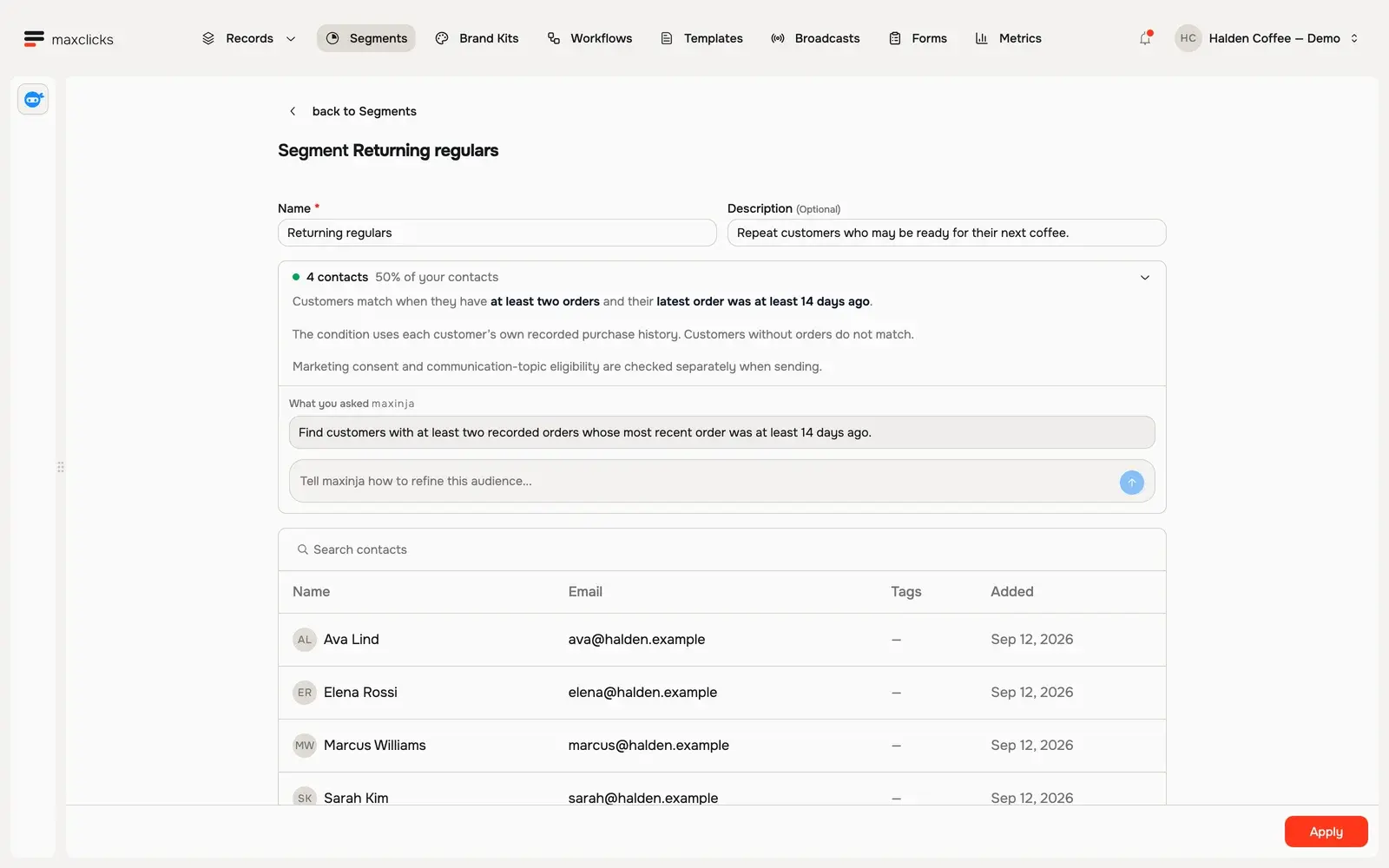
Halden demo · Four returning customers match the purchase-history condition. Sending consent is checked separately.Walkthrough steps
Review Returning regulars: at least two orders and no order in the last 14 days. Inspect the four matching customers, then return to the requirement and refinement box. This walkthrough inspects an existing saved segment.
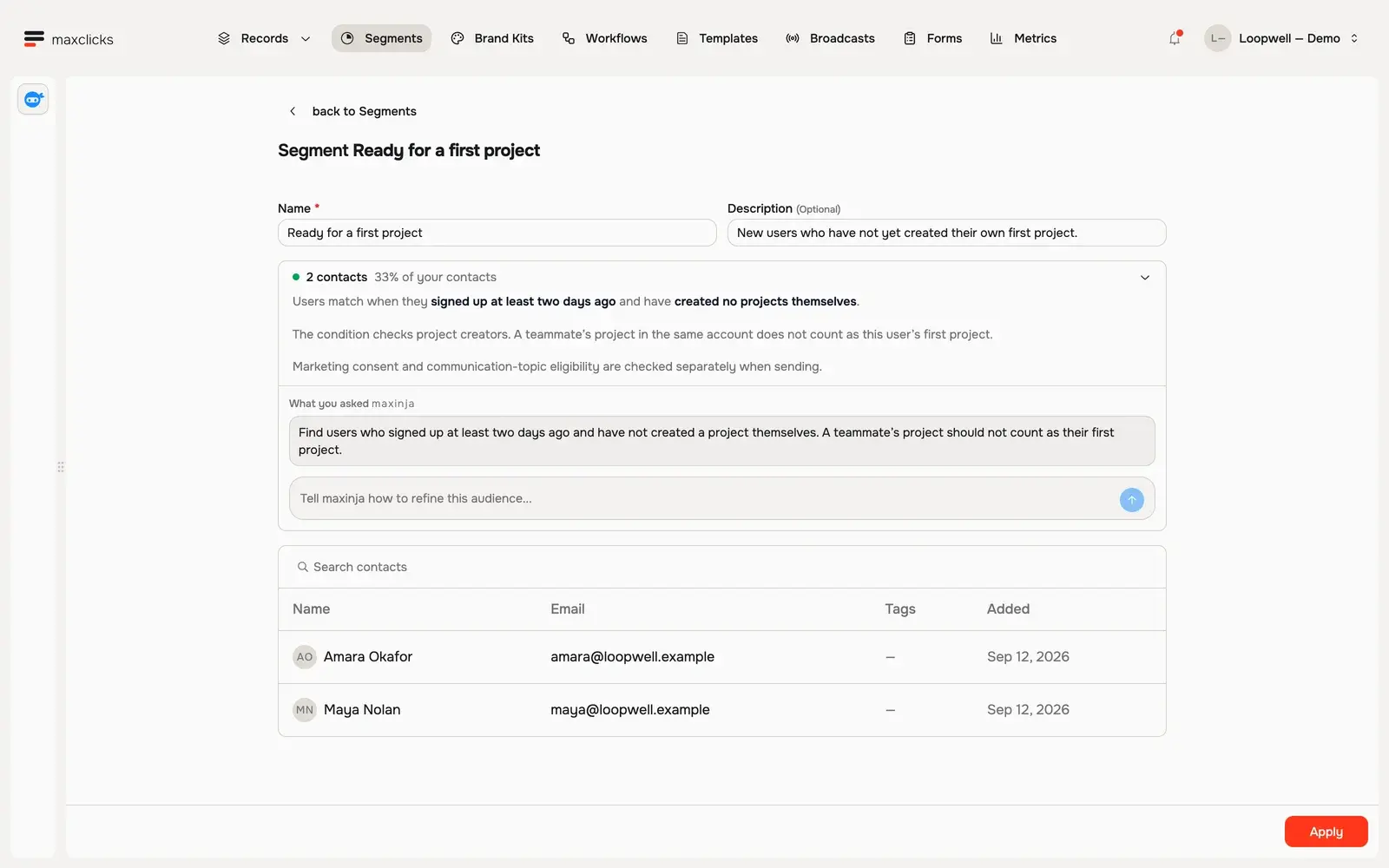
Loopwell demo · Two users have no projects of their own. Sending consent is checked separately.Walkthrough steps
Review the first-project audience and its two matching users. The condition uses signup age and projects created by that individual. Return to the saved requirement and refinement box. Counts refresh from the actual demo records.
Build the audience with the campaign.
The broadcast agent can choose all contacts, select an existing segment or generate a custom condition from your brief. It can then work with the email agent on the message for that audience.
Save definitions you want to reuse.
Use the segment page to generate and refine a reusable audience. A custom broadcast condition belongs to that campaign; it is not automatically a new saved segment.
Let the data make the distinction.
Agents can use stored values and configured evaluated attributes when the condition depends on a calculation or relationship. Inspect matching people; membership still does not override consent or suppression.
In practice
See exactly who your idea includes.
Describe the people and the job together. The broadcast agent can build its audience condition, while the segment workspace creates definitions you can reuse elsewhere.
You bring
A contact schema, available customer fields and a description of the people you want to reach.
You do
Ask for a campaign with a custom audience, or generate a reusable segment on its page. Inspect the readable condition and matching records in either case.
You get
A custom audience condition attached to a broadcast, or a saved segment available for broadcasts and supported workflow conditions.
Illustrative example · Halden Coffee
Find repeat buyers who have gone quiet.
The starting context
Elena
3 orders · last order 45 days ago
Sarah
4 orders · last order 28 days ago
Priya
1 order · last order 60 days ago
The task
Find customers with at least two orders whose most recent purchase was at least 14 days ago.
The result to inspect
Sarah, Marcus, Elena and Ava match. Priya has only one order, so she is outside this reusable segment. A broader return campaign can include her gift purchase. Audience membership remains separate from permission to send.
A campaign audience or a reusable segment.
The broadcast agent can reuse an existing segment or generate a custom filter from your requirements. That filter stays with the broadcast. To create a separate reusable segment, use the segment page. Refine thresholds, windows and exclusions in plain language; the interface is not an arbitrary SQL editor.
Use the relevant customer context.
A condition can depend on stored values or configured evaluated attributes, including calculations and relationships. The fields need to exist and the underlying records need to support the question. A prompt cannot supply missing purchase history.
A saved audience is a definition.
As the underlying customer data changes, the contacts matching the condition can change. Inspect the current audience when preparing a campaign. A displayed count describes that evaluated set; it is not a promise of an identical final delivery count.
Audience membership is separate from permission to send.
A matching contact still needs a usable email address and must pass the sending mode’s eligibility checks. Marketing sends consider email subscription, the selected topic and suppression. Selecting a segment does not override those preferences.