maxinja coordinates specialized broadcast, email and workflow agents. Give it a customer goal: it can investigate data, build an audience and campaign, refine the email, schedule the broadcast and manage the workflow.
An illustrative request becomes a custom campaign audience, a personalized email and a follow-up workflow, with scheduling and publication state set by the brief.
Give maxinja the goal
Build a return-customer broadcast and a follow-up workflow from purchase history. Leave the broadcast unscheduled and the workflow unpublished.
Agents work on the artifacts
The broadcast agent defines its audience and works with the email agent on content; the workflow agent builds the connected journey.
Inspect, refine or activate
Open the resulting work. Ask for changes, a broadcast schedule or workflow publication when that is the next action you want.
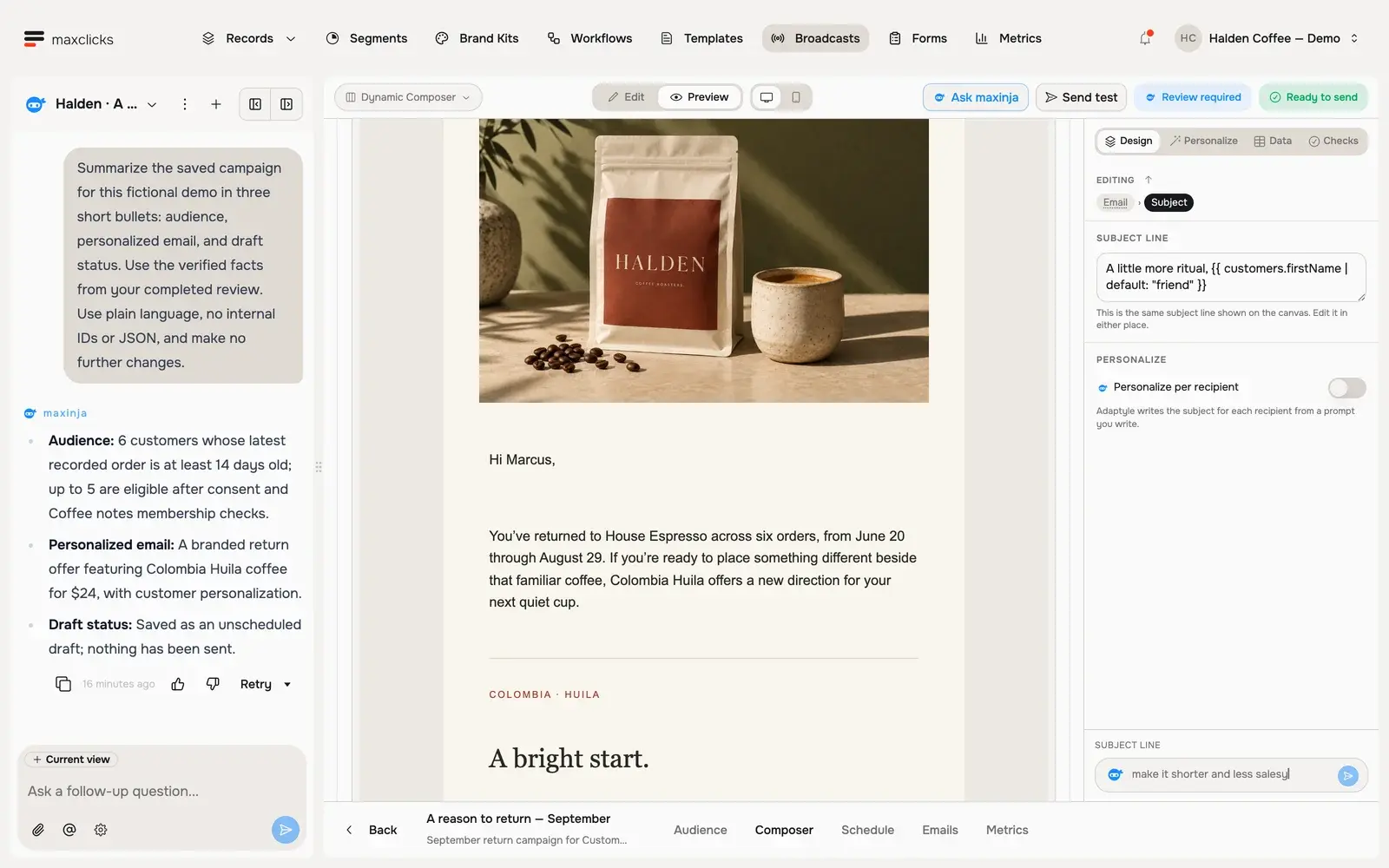
Halden demo · Maxinja checked the audience, corrected the sender and saved the unscheduled draft.Walkthrough steps
Read maxinja’s completed review of a real Halden campaign draft. Inspect the actual audience count, available draft controls and saved Marcus preview. The agent corrected the audience and sender and left the campaign unscheduled. This is a walkthrough of the completed review, not a recording of live campaign creation; no email is sent.
One conversation. Specialized agents.
maxinja routes work to agents for broadcasts, templates and workflows, and can chain their tasks. They create and update the actual product artifacts, including the audience, email content, workflow steps and scheduling state.
Put customer context to work.
Ask about workspace data, then direct the agents with what matters. The broadcast agent can generate a custom audience condition and work with the email agent on a message using the selected customer and brand context.
Keep directing the work.
Follow up with a new requirement while the exchange is running, or return to refine an existing artifact. Specify the intended action: leave a draft, schedule the broadcast, publish the workflow or pause it. These actions have different effects.
In practice
How a goal becomes work across the product.
maxinja coordinates the agents around your request. The conversation leads to records, conditions, email content and workflow configuration you can inspect in their product surfaces.
You bring
Your customer goal, available workspace data, selected brand context and clear instructions about scheduling or publication.
You do
Ask maxinja to investigate the context and coordinate broadcast, email and workflow work. Specify whether you want preparation, refinement, scheduling or publication.
You get
A broadcast with its own audience and email, an editable template, or a configured workflow—together with the scheduling and publication state requested.
Illustrative example · Halden Coffee
Prepare a coffee replenishment campaign.
The starting context
Audience brief
Customers with a previous order, latest purchase at least 14 days ago
Brand
The selected Halden brand kit
Context
Previous purchase and selected product fields
Requested state
Broadcast unscheduled · workflow unpublished
The task
Build a draft return campaign for customers with at least one order whose latest purchase was at least 14 days ago. Use Halden’s kit, the existing email content and selected purchase history. Preserve the Colombia Huila offer and leave the campaign for review.
The result to inspect
Inspect the custom broadcast condition, personalized email template and workflow canvas. This brief deliberately leaves the work inactive. A later instruction can refine it, schedule the broadcast or publish the workflow.
Agents work across the campaign and journey.
The broadcast agent can generate a custom audience condition, choose an existing segment, create or refine email content through the email agent, and update the schedule. The workflow agent builds and edits steps and can publish, pause or unpause. A custom campaign audience is not automatically a reusable saved segment.
Prepare the workspace during onboarding.
While initial setup is incomplete, the onboarding assistant can help with domain status, senders, topics, initial schemas and attributes, CSV planning, brand extraction and starter artifacts. Create the workspace first. This setup capability does not mean unrestricted creation of every entity in general chat.
Direct the action as well as the content.
Agents can refine content, change scheduling, and publish or pause workflows. State when work should remain unscheduled or unpublished. For onboarding imports, inspect the proposed mapping and samples before import; website extraction publishes its kit immediately. Review the resulting state as well as the writing and configuration.
Know the boundaries before assigning the job.
maxinja does not author forms or replace every product screen. Eligible onboarding sessions are platform-funded while setup is incomplete; this is not unlimited free AI. Ordinary editor generation still needs credits, and email sending needs a verified domain.