Describe what should happen after a customer signal. maxinja creates the steps, configures their logic and connects the flow. It can publish, pause or unpause the workflow when you request that action.
Halden demo · Draft workflow: wait 14 days, check for another order, then decide whether to follow up.Walkthrough steps
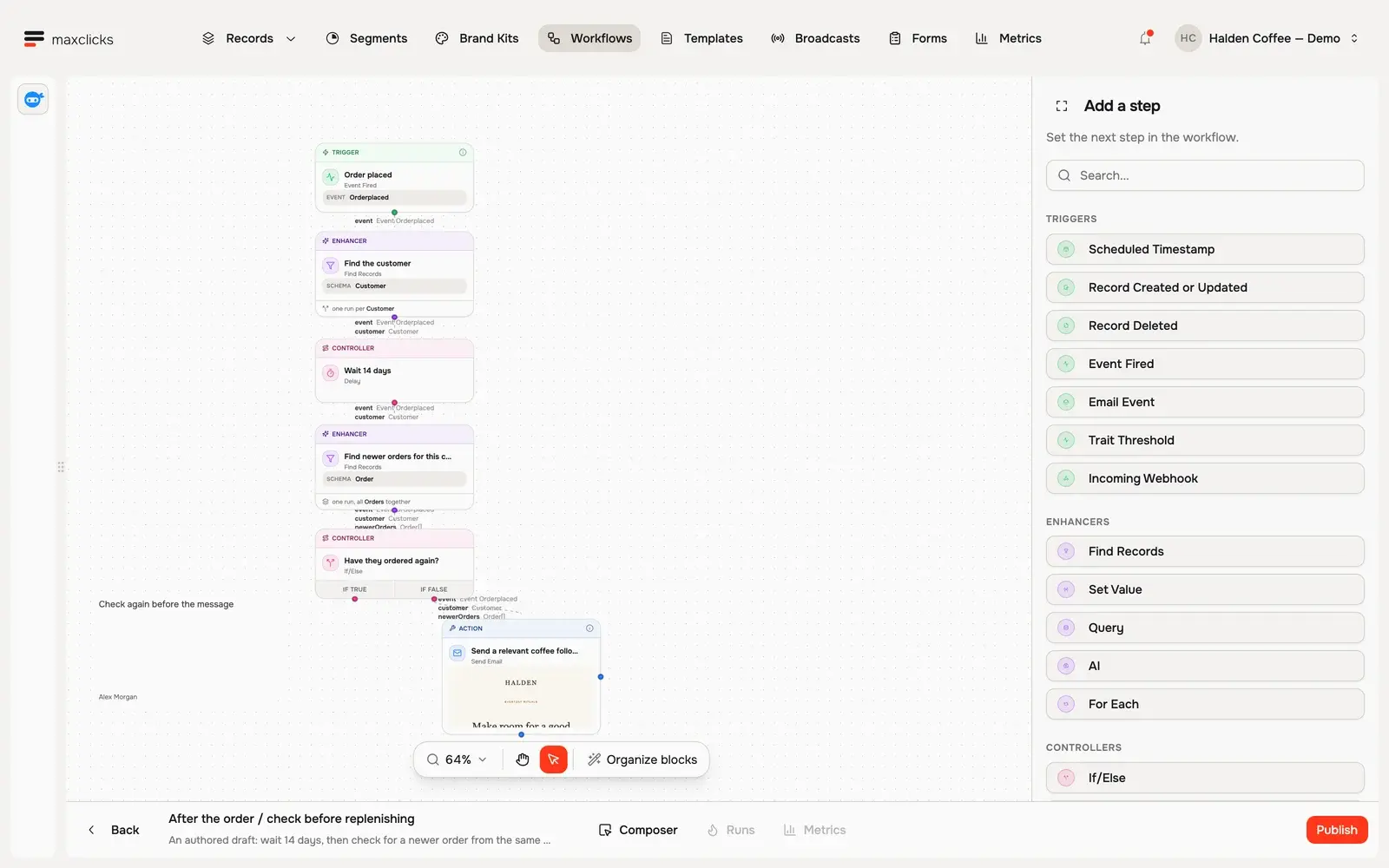
Inspect the draft post-purchase workflow. Open its Orderplaced event trigger, 14-day delay, compiled condition checking newer orders, and configured email step. The true branch ends the follow-up; the false branch continues. This draft is not published by the tour.
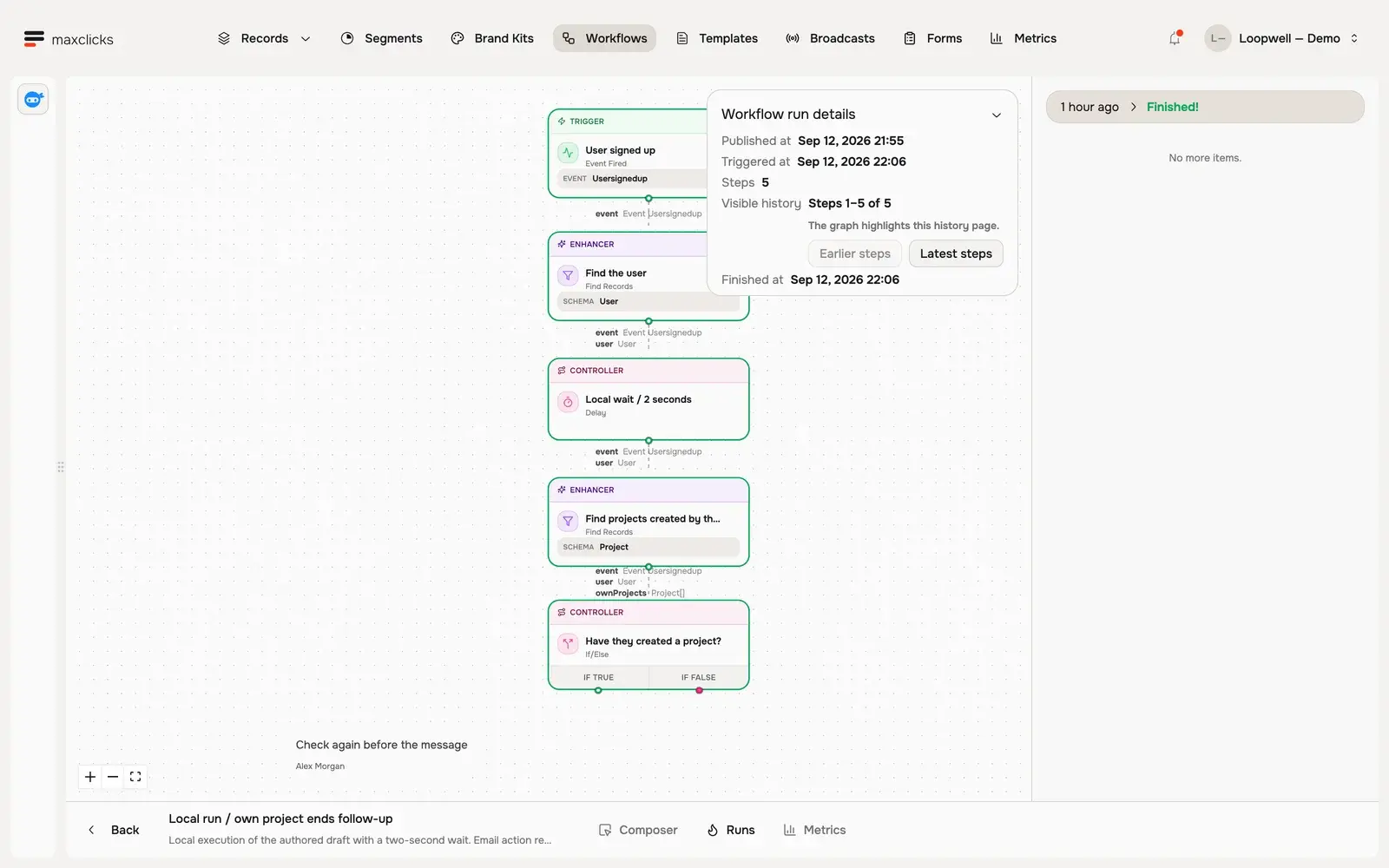
An actual completed local run for Daniel using a two-second test copy. His own project ends the follow-up. The email action was removed before publication; no message was sent.
Give the agent the whole journey.
Ask for a workflow from a business goal. The workflow agent builds steps, configures their inputs and conditions, connects the branches and lays out a canvas you can open and edit.
Ask it to change the behavior.
Add a wait, query current data, update records, call an HTTP endpoint or personalize an email step. maxinja works on the existing workflow and its steps, so your next instruction changes the actual journey.
Direct the running state.
The agent can publish, pause and unpause workflows. Run history exposes recorded progress and failures. Pausing holds further execution; it does not undo completed actions or recall accepted email.
In practice
Make the trigger, decision and next action explicit.
The agent turns your instructions into configured steps and links. Publication activates a version; run history makes the resulting execution inspectable.
You bring
A defined trigger, the data carried into the run and the customer context each subsequent step needs.
You do
Ask maxinja to build or refine the journey, then specify whether to leave it as a draft, publish it, pause it or unpause it.
You get
A versioned workflow and inspectable runs showing recorded step progress, waiting states and failures.
Illustrative example · Halden Coffee
Follow up when the customer has not returned.
The starting context
Trigger
A configured order event for a contact
Order context
The triggering order and its customer
Delay
Fourteen days
Next check
Look for an order placed after the triggering order
The task
After an order, wait fourteen days. Check for a newer purchase; end the journey if one exists. Otherwise, prepare the personal return email. Leave the workflow as a draft.
The result to inspect
The Halden canvas contains the event, fourteen-day wait, newer-order query, branch and email step. It is unpublished. The separate Loopwell example shows a completed local test run that ended without sending email.
Start with a business signal.
Supported triggers cover a scheduled timestamp, a record being upserted or deleted, a business event, an email event, an incoming webhook and a configured aggregate-field threshold. Choose the signal and payload your source actually provides.
Combine actions that match the job.
Use conditions and switches to choose a branch, delays to wait, and loops to process a collection. Query or find records, set values, use an AI step, write or delete records, fire an event, call an HTTP endpoint or send an email. Each step needs its own input and configuration.
Draft, publish, pause and unpause are distinct actions.
The workflow agent supports each of these operations. Ask for a draft when you want the journey left inactive; request publication when you intend to activate its version. Inspect steps that write or delete records or call external services. An editable draft alone does not run.
Understand pauses and recovery.
Pausing holds further execution; it does not undo completed changes or recall accepted email. Runs can wait through temporary capacity or credit shortages and retain recorded progress. Run history helps diagnose failures, but a manual retry or cancel button for each run is not available.