Skip to content

B2B SaaS

Help teams start, expand and renew.

Use each person’s progress and account context to guide first projects, seat upgrades and renewal follow-ups.

LoopwellRecipient preview

Saved product preview

Help each signup create their first project.

Use their goal and their team’s existing projects to suggest work they can start themselves.

Preview as

Starts when

A person signs up; the journey waits two days.

Email for Maya

First-project activation, in the product.

Check the person’s own projects. Shape their email from their goal, progress and team context.

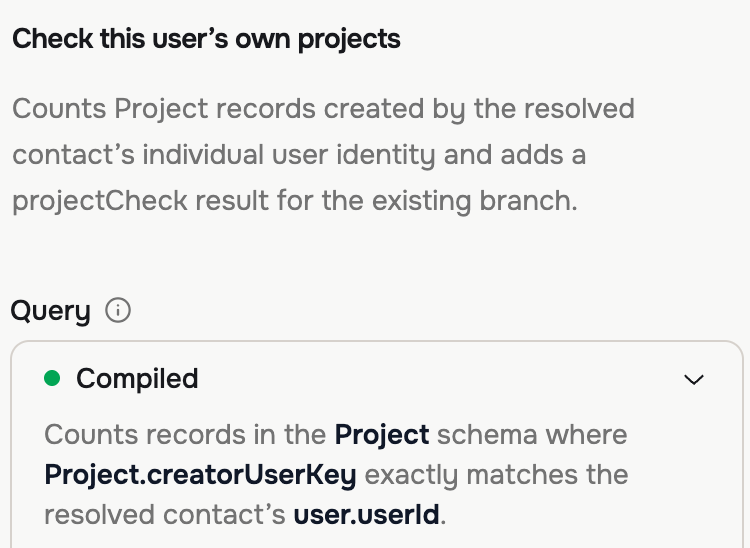
QueryThe saved Query step counts their projects, without counting a teammate’s work.
Actual saved Query step: Check this user’s own projects. It counts Project records created by this person, not by their teammates.
A saved recipient preview. Maya’s email focuses on launch sign-off, separate from Daniel’s assets.
Saved Adaptyle preview for Maya: create a launch plan sign-off project separate from Daniel's launch assets, then get sales and design approval. The Create your first project button stays fixed.

Saved Query configuration and separately generated recipient preview.

Change the follow-up when the account changes.

Query project activity or account limits before sending. Use an AI step for relevant guidance; stop when the intended action is complete.

Explore workflows
Example workflowFirst-project activation
  1. Otherwise, stop

Query before following up

Find projects created by this person. Continue only when their own project count is zero; a teammate’s project does not count.

Reuse this context with evaluated attributes

Start with one customer milestone.

Choose a first project, team expansion or rollout goal. We’ll connect the relevant people and account records, then define what completes the follow-up.

Separate the person’s progress from the account’s.

Connect people to accounts, projects and subscriptions. Evaluated attributes distinguish their own progress from work their teammates have completed.

Start with the data you have.

Use the Public API for people, accounts and project records. Send product events with stable identities; keep ownership and plan limits current.

See connection options

Keep permissions in your product.

Recommend only the actions the recorded role permits. Your application enforces access; approved plan details and links remain authored.

Connect product records and events

  1. People
  2. Accounts
  3. Projects
  4. Subscriptions
  • People, account IDs and stated goals
  • Projects, creators and completion events
  • Plan limits, roles and renewal dates

Evaluated attribute

Has this person created their own first project?

Maya has no project of her own. Daniel has one. Sharing an account does not make his project hers.

Start with one campaign, with us.

Meet the founder to map your data, review personal emails and estimate setup and AI costs.

Book a demo
Your first campaign
First-project activation
Data to connect
People, goals, account relationships, projects and each project’s creator.
Outcome to evaluate
First projects created by these people in your product records.