Generating customer logic once, evaluating it many times
How evaluated attributes turn a written requirement into saved logic, and how we check the result against the intended customer relationship.

In this article
Evaluated attributes are fields calculated from other customer data. In maxclicks, a marketer describes what a field should return, and AI generates a reusable definition. We save that definition and run it when the field is requested.
This keeps model calls in the authoring step. Reading the value runs the saved logic, so we can check the calculation separately from the prompt that produced it.
A project count is a useful example. The calculation is simple, but choosing which projects to count affects who receives an onboarding message.
Counting a person's own projects
In our fictional Loopwell workspace, Maya and Daniel share an account. Daniel has created a project. Maya hasn't.
Counting projects by account gives both people a value of one. Counting by creator gives Daniel one and Maya zero. For a reminder to create a first project, we need the second calculation.
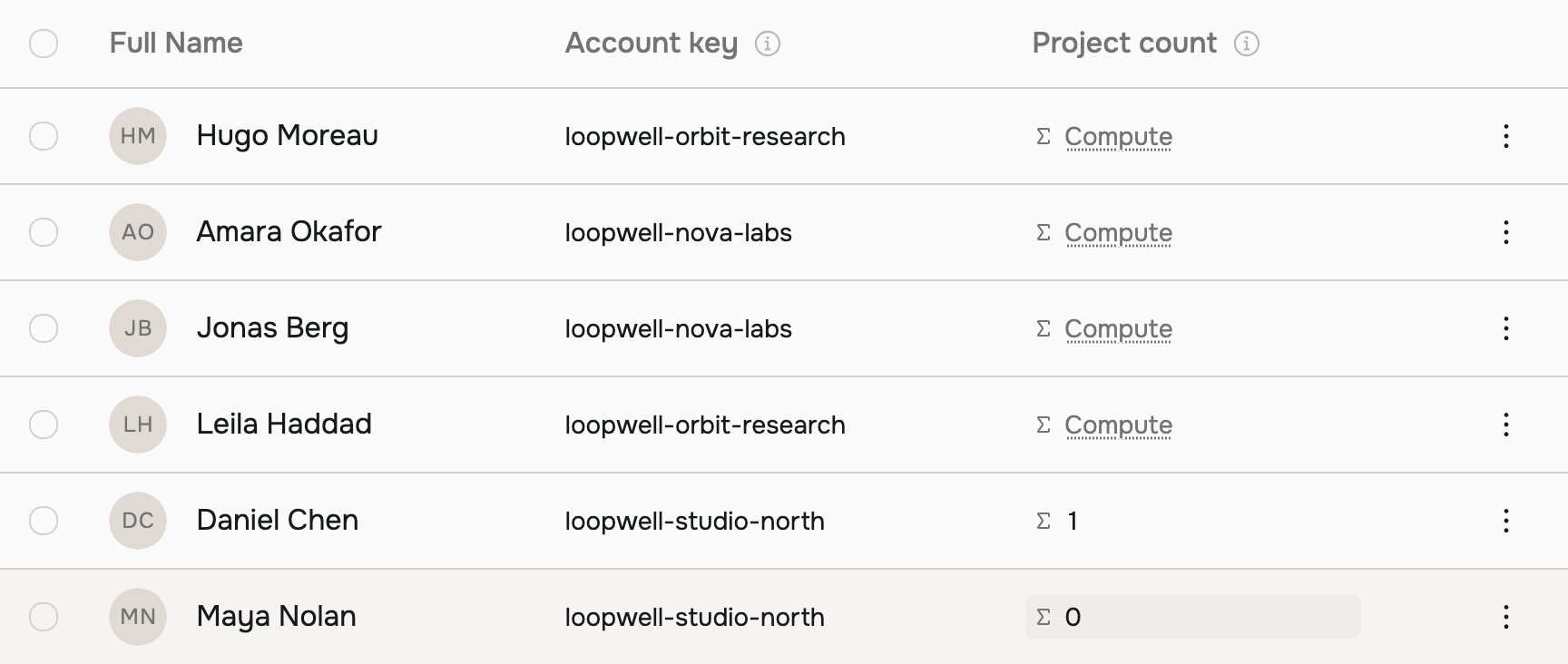
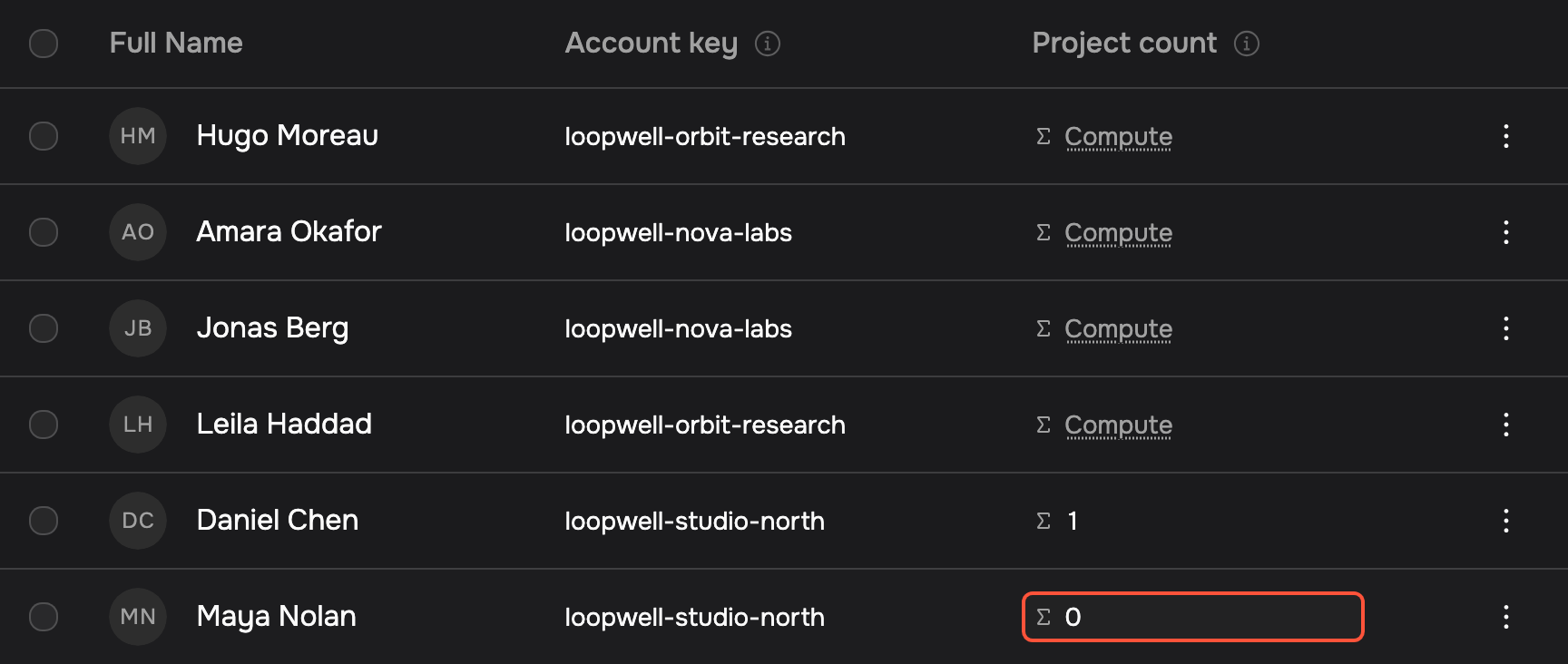
The requirement needs to say which relationship to follow. “Count projects” leaves that open. Specifying that a project's creator identifier must match the person's identifier gives us something we can test against records.
AI helps write this definition. Once it is saved, matching the identifiers and counting the records is ordinary computation.
Handling missing identity
Here's a simplified version in JavaScript. We start with the relevant project records and check that we have a person to match them to:
function ownProjectCount(person, projects) {
  const id = person.userId
  if (typeof id !== 'string' || id.trim() === '') {
    return { status: 'unknown', reason: 'missing-user-id' }
  }
  return {
    status: 'known',
    value: projects.filter((project) => project.creatorId === id).length,
  }
}

function reminderDecision(result) {
  if (result.status === 'unknown') return 'review'
  return result.value === 0 ? 'remind' : 'skip'
}
When the identifier is present, zero means no supplied project matches it. When the identifier is absent, the example returns unknown and sends the decision to review.
The demo shown above uses zero as its fallback. For a reminder, we'd handle a missing identifier separately so it doesn't count as inactivity.
Checking the calculation
We can give the function the same account and creator relationships shown in the screenshot:
const maya = { userId: 'maya', accountId: 'studio-north' }
const daniel = { userId: 'daniel', accountId: 'studio-north' }
const projects = [{ creatorId: 'daniel', accountId: 'studio-north' }]

console.log(ownProjectCount(maya, projects))
// { status: 'known', value: 0 }
console.log(ownProjectCount(daniel, projects))
// { status: 'known', value: 1 }
Daniel's project catches the mistake of counting by account. We also test an identifier that looks similar to Maya's, and check what the reminder decision does with absent or blank identity.
The full example includes ten assertions. You can run it with node evaluated-attributes.mjs. Here's what it checks:
| Input | Expected and observed result |
|---|---|
| Daniel's project shares Maya's account | Account count 1; Maya own count 0 |
| Daniel's own project | Own count 1; skip reminder |
| Absent or blank user identifier | Unknown; review |
| A project created by maya-2 | Does not increase Maya's count |
| Maya's project is added later | New evaluation 1; earlier result remains 0 |
Scroll horizontally to read all columns.
A generated definition needs tests like these against its own records. Schema validation can catch a wrong result type, but both an account count and a creator count can be valid numbers.
Evaluating dependencies
In maxclicks, the saved definition includes its expected result shape and references to other data. When the field is requested, we resolve its dependencies, run the logic with execution limits, and validate the result.
Some definitions depend on other evaluated attributes. Those values must be available first. If two definitions depend on each other, evaluation fails with a cycle error. Returning an empty value would hide the problem and could change a later campaign decision.
The runtime also keeps track of which fields the caller requested. It can read an intermediate dependency to compute a result without including that dependency in the returned customer data. We also limit the number of related records expanded for a value.
Reading the value after a wait
The last check adds a project created by Maya. A new evaluation returns one; the result we read earlier remains zero.
The same issue applies to a workflow that waits two days before sending a reminder. Reading the count at signup tells us what was in the records then. A Query step after the wait can retrieve the records for the next decision.
That read still depends on data reaching the platform. If Maya's project event arrives late, the count can be out of date even though the calculation has just run. Reusing a definition gives us consistent logic, but we still need to choose when to read it and keep its source data current.
What must stay deterministic when AI writes an email covers the next part: using customer context in generated messages and recovering interrupted generations.