Loading the guide…
Set up consent and double opt-in
Learn how form consent modes work, how double opt-in holds a contact until they confirm, how the audit trail records consent, and how to add your own CAPTCHA.
On this page
Collecting an email address is not the same as earning permission to market to it. maxclicks forms treat consent as a first-class setting: you choose how a submission grants consent, whether to confirm it with double opt-in, and how each decision is recorded for compliance. This article explains the consent modes, the double opt-in flow, the audit trail, and the optional CAPTCHA you bring your own keys for. It assumes you have already built a form, as covered in create a form.
How consent works on a form
A form's consent setting decides whether a submission subscribes the new contact to marketing email. Crucially, subscriptions, topics, and tags are always derived server-side from the form's configuration and the consent decision, never taken from the submitted field values. A visitor cannot subscribe themselves to a topic or set a tag by tampering with the form; only your configuration and their consent decision determine it.
Consent modes
maxclicks offers three consent modes. Pick the one that matches how the form actually asks for permission.
| Mode | Behavior |
|---|---|
| On submission | Submitting the form implies consent. The contact is subscribed to marketing email. Use this only when the form clearly states that submitting signs the visitor up. |
| On submission if checked | Consent requires the visitor to tick a checkbox. Subscribed only if they check it; if they submit without checking, the submission is captured but grants no subscription. |
| Off | The form collects no marketing consent. Submissions are captured but never subscribed to marketing email. |
A form can also be tied to a communication topic, in which case the consent decision governs that topic. Whichever mode you choose, the outcome is applied server-side, so the recorded subscription state always reflects your configuration and the visitor's choice rather than anything the visitor could submit directly.
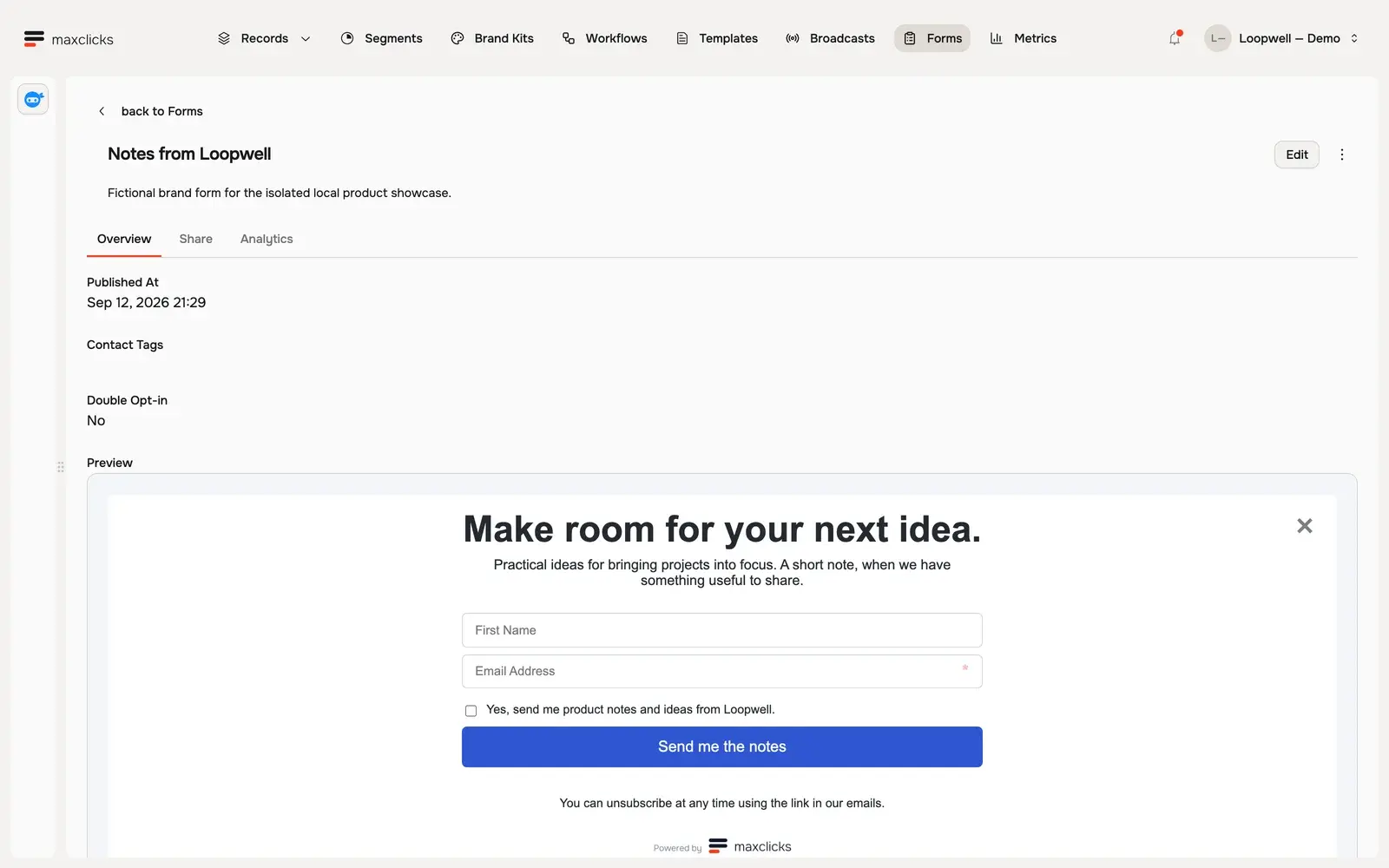
Walkthrough steps
Inspect the published Loopwell form with first name, required email and optional marketing consent. Open Share to see its local hosted link and embed/API options, then return to the preview. Double opt-in is off; no form submission is performed.
Double opt-in
Double opt-in adds a confirmation step between submission and subscription. It is the stronger consent standard and is required or expected in several jurisdictions.
When a form has double opt-in enabled and the visitor consents, the flow is:
- The submission is held
A consenting submission is not immediately turned into a subscribed contact. maxclicks holds it pending confirmation.
- A confirmation email is sent
The visitor receives a confirmation email containing a single-use link. The link is valid for 24 hours, and the sending is throttled to prevent abuse.
- Confirmation completes the signup
Only when the visitor clicks the link within 24 hours does maxclicks create and subscribe the contact, recorded as a double opt-in in the audit trail. If they never confirm, no subscribed contact is created.
There is one important exception. A submission that declined consent (under the checkbox mode, submitted without ticking the box) skips double opt-in entirely, because there is nothing to confirm. What happens next depends on whether maxclicks already knows the address. A new address is stored directly as an unsubscribed contact. If a contact with that address already exists, their subscriptions and topics are left exactly as they were, so declining on a form never withdraws consent someone gave earlier. Consent is withdrawn through an unsubscribe, never by submitting a form.
The consent audit trail
Every consent decision is recorded. maxclicks keeps a consent audit trail on contacts so you have a durable, compliance-grade record of how and when permission was granted or withdrawn. Double opt-in confirmations are logged specifically as double opt-in, distinguishing them from a single opt-in.
This trail matters for regulations such as GDPR and CAN-SPAM, where you may need to demonstrate that a contact genuinely consented. Because the record is created automatically as part of the consent flow, you do not maintain it by hand. You can see a contact's audit trail from its record, as described in add and edit contacts.
Add a CAPTCHA
Public forms attract spam and bot submissions. Built-in rate limiting always applies, and on top of it you can protect a form with a CAPTCHA, using your own provider keys rather than a shared one. Three providers are supported:
- Cloudflare Turnstile
- Google reCAPTCHA v3
- hCaptcha
Setting this up happens in two places. The keys live in your space settings, saved once per provider and reused by every form. The choice of which provider a given form uses lives in that form's builder. There is no key field on the form itself.
- Get your keys from the provider
In the provider's own dashboard, create a site key and a secret key for Turnstile, reCAPTCHA v3, or hCaptcha. You need both: the site key is public and renders the challenge, and the secret key is what maxclicks uses to verify a submission.
- Save them in your space settings
Open Settings, then Forms Protection, and select the provider. Paste in both the Site key (public) and the Secret key (private), then click Save keys. The button stays disabled until both fields are filled. Your secret key is encrypted at rest and never shown again.
- Turn it on for the form
In the form builder, open the Form Protection card and pick the provider. Submissions to that form are then challenged before they are accepted.
A CAPTCHA is worth adding to any form exposed on a public page, especially one that feeds an automation, since bot submissions waste records and can trigger unwanted downstream runs. One trade-off to know: once a form is protected, its submit endpoint rejects any submission that arrives without a valid challenge token, so maxclicks stops offering the build-your-own-form snippets for it. Share a protected form as a hosted link or an embed instead, as covered in publish and share a form, or turn protection off if you need the endpoint directly.
Why consent matters for your sends
The consent mode you pick is not only a compliance setting: it determines whether a contact can actually receive your marketing email later. maxclicks enforces consent at every send. Marketing mail only reaches contacts who are subscribed to the email channel and, where the content is bound to a topic, are members of that topic. A contact captured with consent off, or one who never confirmed a double opt-in, is not subscribed, so a later broadcast or workflow email passes them by no matter how the send is built.
This is why the honest mode matters. If you subscribe people through a form that did not clearly ask for permission, you build a list that looks larger than the audience you can legitimately email, and you risk complaints and suppressions that damage your sending reputation. A double opt-in list is smaller but cleaner: every address on it has actively confirmed, which tends to mean better engagement and fewer spam reports.
Consent is never a one-time lock, either. A contact can unsubscribe later from any marketing email's footer, and that decision is recorded in the same audit trail. maxclicks manages the subscription and suppression bookkeeping for you; your job at the form stage is to set the mode that reflects reality.
Where consent fits with the rest of the form
Consent is one of three things every live form needs settled: its fields (in create a form), its consent and confirmation behavior (here), and being published and placed on your site (in publish and share a form). Because subscription state flows from the consent decision, getting the mode right is what keeps your marketing sends compliant down the line.
Frequently asked questions
Which consent mode should I use?
Match the mode to how your form asks. Use on submission only when the form clearly states that submitting subscribes the visitor. Use on submission if checked when you present a consent checkbox. Use off when the form should never subscribe anyone to marketing email.
What happens if a visitor never clicks the double opt-in link?
No subscribed contact is created. The held submission expires: the confirmation link is single-use and valid for 24 hours, so an unconfirmed signup never becomes a subscriber. The visitor would submit the form again to get a fresh link.
What happens to a submission that declines consent?
Under the checkbox mode, a submission sent without ticking the consent box skips double opt-in. If the address is new, it is stored directly as an unsubscribed contact: captured, but never subscribed to marketing email. If a contact with that address already exists, their subscriptions and topics are left untouched, so an existing subscriber is not unsubscribed by declining on a form.
Can a visitor subscribe themselves to a topic through the form?
No. Subscriptions, topics, and tags are derived server-side from the form's configuration and the consent decision. They are never read from the submitted values, so a visitor cannot grant themselves a subscription the form was not configured to give.
Do I need my own CAPTCHA keys?
Yes, and you need two of them. maxclicks supports Turnstile, reCAPTCHA v3, and hCaptcha on a bring-your-own-key basis, so you create a site key and a secret key in your provider's dashboard. Save both under Settings, then Forms Protection, which needs Admin permission. They are stored per space, so you save them once and any form can then select that provider.
Why does my protected form reject every submission?
Its provider has no keys saved. Verification fails closed: if a form names a provider that is not configured for the space, every submission is rejected. Ask an admin to save the site key and secret key under Settings, then Forms Protection, or switch the form's protection back to none.
Did this article answer your question?