Loading the guide…
Use segments in broadcasts and workflows
Learn how to reuse a saved segment as a broadcast audience and in workflow triggers and steps, and what keeps one from being deleted.
On this page
A segment is worth building once you plan to reuse it. The same saved filter can target a broadcast, gate a workflow, and decide which changes a webhook streams out. This article shows how to put a segment to work as a broadcast audience and inside a workflow, what stops a segment from being deleted, and when to save a segment versus writing a one-off filter. If you have not built one yet, start with create a segment.
Where segments are used
A segment is a reusable definition of an audience. Because it is generated and stored once, you can reference it from several places rather than re-describing the same people each time:
- Broadcast audiences: send a broadcast to the contacts a segment matches.
- Workflow triggers and steps: gate a trigger, or filter the records a step finds, by a segment.
- Webhook filters: on contact and email-event webhook triggers, stream only changes to contacts a segment matches.
In every case the segment is the same underlying filter. Change the segment once, and every place that references it uses the new definition the next time it runs. That single-definition property is the whole point of a segment.
Segments filter contacts, so they apply wherever the audience is a contact schema. For object records, you filter with a custom condition instead, since segments do not exist for objects.
Use a segment as a broadcast audience
A broadcast sends to one contact schema, and within that schema you choose who receives it. A saved segment is how you narrow it down.
- Open the broadcast audience step
Create or open a broadcast and go to its audience step. The broadcast is already bound to one contact schema, such as Customer.
- Pick the segment
In the Segment field, select your saved segment, such as Active trial users. The broadcast now targets exactly the contacts that segment matches. Leaving the field on All contacts in this schema reaches everyone instead.
- Check the live count
maxclicks shows a live count of matching contacts. Use it as a sanity check: zero means no one receives the email, and a count far above what you expect means the segment is broader than you thought.
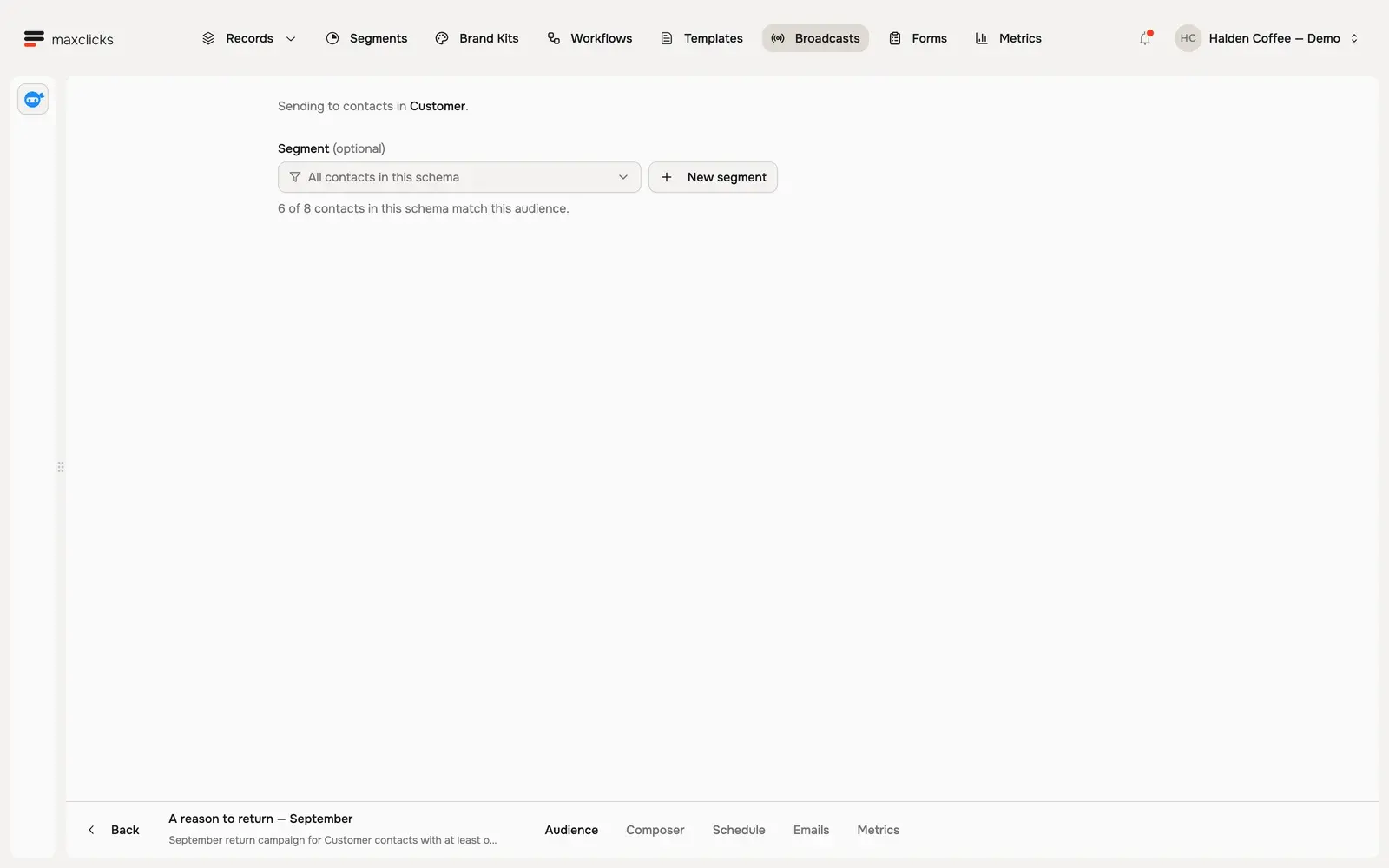
A broadcast audience is either every contact in the schema or one saved segment. There is no inline filter builder on the audience step, so when you need a one-off audience for a single send, ask maxinja to set the broadcast's audience and it generates the condition on that broadcast for you.
The count is an estimate of who matches. maxclicks resolves the audience live at send time, then removes contacts with no email address or no email consent, so the number actually sent is often lower than the count. For the full send path, see send your first broadcast and create and send a broadcast.
Use a segment in a workflow
Workflows use segments to decide which contacts flow through them. A segment can gate the trigger that starts a run, and it can filter a step that looks up records mid-run. Building a workflow is covered in build your first workflow; this section focuses on the segment parts.
Filter a trigger
A Record Created or Updated trigger bound to a contact schema can filter by a segment, so runs start only for contacts the segment matches. This turns a broad "any customer changed" trigger into a targeted "a customer entered this audience" trigger.
Conditioned triggers use entered-criteria semantics. When a contact is created and already matches the segment, the trigger fires. On an update, it fires only when the contact enters the segment: it did not match before and matches now. A contact that already matched, and still matches after an edit, does not fire the trigger again. This is what makes "when a customer becomes high-value" a clean, once-per-transition trigger rather than a repeat firing on every save.
Filter a step
A Find Records step looks up contacts from your database mid-run. You can point it at a segment so it returns only the matching contacts, then act on them downstream.
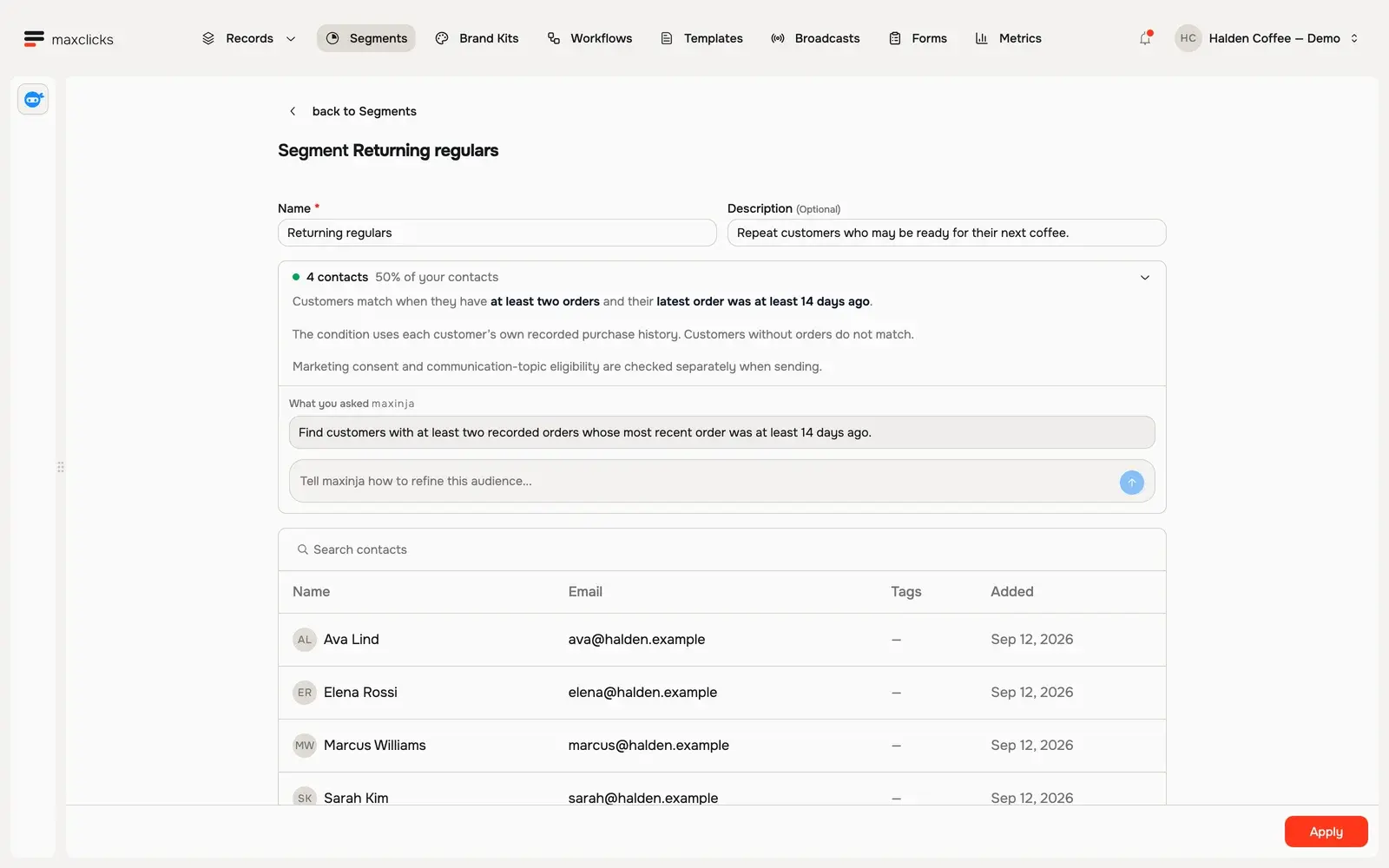
Walkthrough steps
Review Returning regulars: at least two orders and no order in the last 14 days. Inspect the four matching customers, then return to the requirement and refinement box. This walkthrough inspects an existing saved segment.
Because a workflow reads records fresh at each step, a segment used inside a workflow always reflects the contact's current state, not a snapshot from when the run started. If a segment defines part of your automation's logic, keep its definition stable, since changing it changes how live runs behave.
What blocks deleting a segment
maxclicks tracks every place a segment is referenced. A segment that is in use cannot be deleted: attempting to delete one that a broadcast, workflow step, webhook, evaluated attribute, or another segment depends on returns an "entity in use" error. This protection stops you from quietly breaking an audience or an automation that relies on the segment.
To delete a segment, remove its references first.
- Find what references the segment
Identify what uses the segment: a broadcast audience, a workflow trigger or Find Records step, a webhook filter, an evaluated attribute, or another segment built on top of it.
- Remove or repoint each reference
In each place, switch the audience or filter to a different segment, to a one-off condition, or to every record in the schema, so nothing depends on the segment anymore.
- Delete the segment
With no references left, delete the segment from its page on Segments.
The same reference tracking is why a segment can safely be reused: nothing you depend on can be pulled out from under you. It also means composing segments (building one segment on another) creates a dependency you must unwind from the top down.
Segments versus custom filters
Workflow triggers and steps take a one-off condition written inline, instead of a saved segment. A broadcast's Audience tab offers saved segments only, but maxinja can write a custom filter onto a single broadcast when you ask it to.
| Option | Reusable? | Best for |
|---|---|---|
| Saved segment | Yes, referenced anywhere | An audience you use more than once, or want to keep consistent across sends and workflows |
| Custom filter or condition | No, lives on one entity | A one-off audience for a single broadcast, trigger, or step |
A saved segment is a named, shared definition. Define "active trial users" once, and every broadcast and workflow that references it stays in lockstep: fix the definition in one place and every use updates. A custom filter lives on the one broadcast, trigger, or step it was written for, and cannot be reused or updated centrally.
The rule of thumb: if you would describe the same audience twice, save it as a segment. If it applies to one send and nowhere else, a custom filter is fine. Both are generated the same way, by describing the audience and letting maxinja produce the logic, as explained in meet maxinja, your AI assistant.
Frequently asked questions
Can I use a segment for an object schema?
No. Segments filter contacts, so they only apply where the audience is a contact schema. For a workflow trigger or step bound to an object schema, use a custom condition instead, which you describe the same way you would a segment.
Why can't I delete my segment?
The segment is still referenced somewhere: a broadcast audience, a workflow trigger or Find Records step, a webhook filter, an evaluated attribute, or another segment. maxclicks blocks the deletion so those do not break. Repoint or remove each reference, then delete the segment.
If I edit a segment, does it change my live broadcasts and workflows?
Yes. A segment is a single definition, so every broadcast audience and workflow that references it uses the updated definition the next time it resolves. That consistency is the benefit of a segment, but it means you should be deliberate when changing one that is widely used.
Why does a workflow trigger only fire when a contact enters a segment?
Conditioned triggers use entered-criteria semantics. On an update, the trigger fires only when a contact transitions from not matching the segment to matching it, not every time the contact is saved. This keeps "when a contact joins this audience" from firing repeatedly for contacts that already match.
Does the broadcast send to everyone the segment count shows?
Not always. The count estimates who matches the segment. When the broadcast runs, maxclicks removes contacts with no email address or no email consent, so the number actually sent can be lower than the count. Consult the broadcast's metrics for the real outcome.
Did this article answer your question?