Build your first workflow
Build a customer follow-up that waits, checks for a new purchase and emails only when the reminder is still relevant.
On this page
Follow up with a customer only while the message is still useful. For a coffee business, that can mean waiting 14 days after an order, checking for another purchase, and sending a reminder only when none exists. A workflow makes that decision separately for each qualifying event.
Start with an unpublished draft. You will inspect the customer match, the check after the wait and the email before turning it on. Use a broadcast for one reviewed audience at a chosen time.
Build a first follow-up
Have customer records, linked orders with dates and statuses, and an order event that identifies the buyer. For the email, have a published brand kit, a verified sender and contacts eligible for marketing email.
- Create the draft
Open Workflows → New workflow and name it “Repeat-purchase follow-up”. Brief maxinja: “Build an unpublished journey from our order event. Find the customer who placed that order. Wait 14 days, then query whether that customer has a newer completed order. If they do, finish. Otherwise prepare a marketing email with our supplied product and link. Keep it unpublished.”
- Check the customer and decision
Inspect Find Records; it should identify one customer from the event. Inspect Query after Delay; it must compare this customer's completed orders with the triggering order. The If true path ends when a newer order exists; If false continues to email. A valid empty result is different from a failed query.
- Preview the email
Open the email and confirm Sends to uses that contact. Preview the sender, offer, link and missing-data behavior.
Use Query for the order lookup and a compiled If/Else for the decision. An AI step is useful when you need to interpret text or produce a recommendation for later steps. Adaptyle adapts a passage inside the email for each recipient. maxinja builds these saved settings; runtime generation happens later. See choose the right tool.
What a workflow is
A trigger starts a run. Steps look up data, wait, branch and act. Links set their order. A run is one execution, with a history you can inspect. The library contains 21 step types, including seven triggers and the Note used to annotate the canvas.
Workflows live in the top navigation. You need Write permission to build and edit one. A new draft starts no runs. Editing an already published workflow changes its draft while the published version can continue operating.
Tour the canvas
Select a step to open its sidebar. The available-data panel shows what earlier steps supply at that position; use it to check which customer, event and lookup result a condition can use. Normal fields save as you edit. For generated logic, send the requirement to maxinja and review its saved explanation.
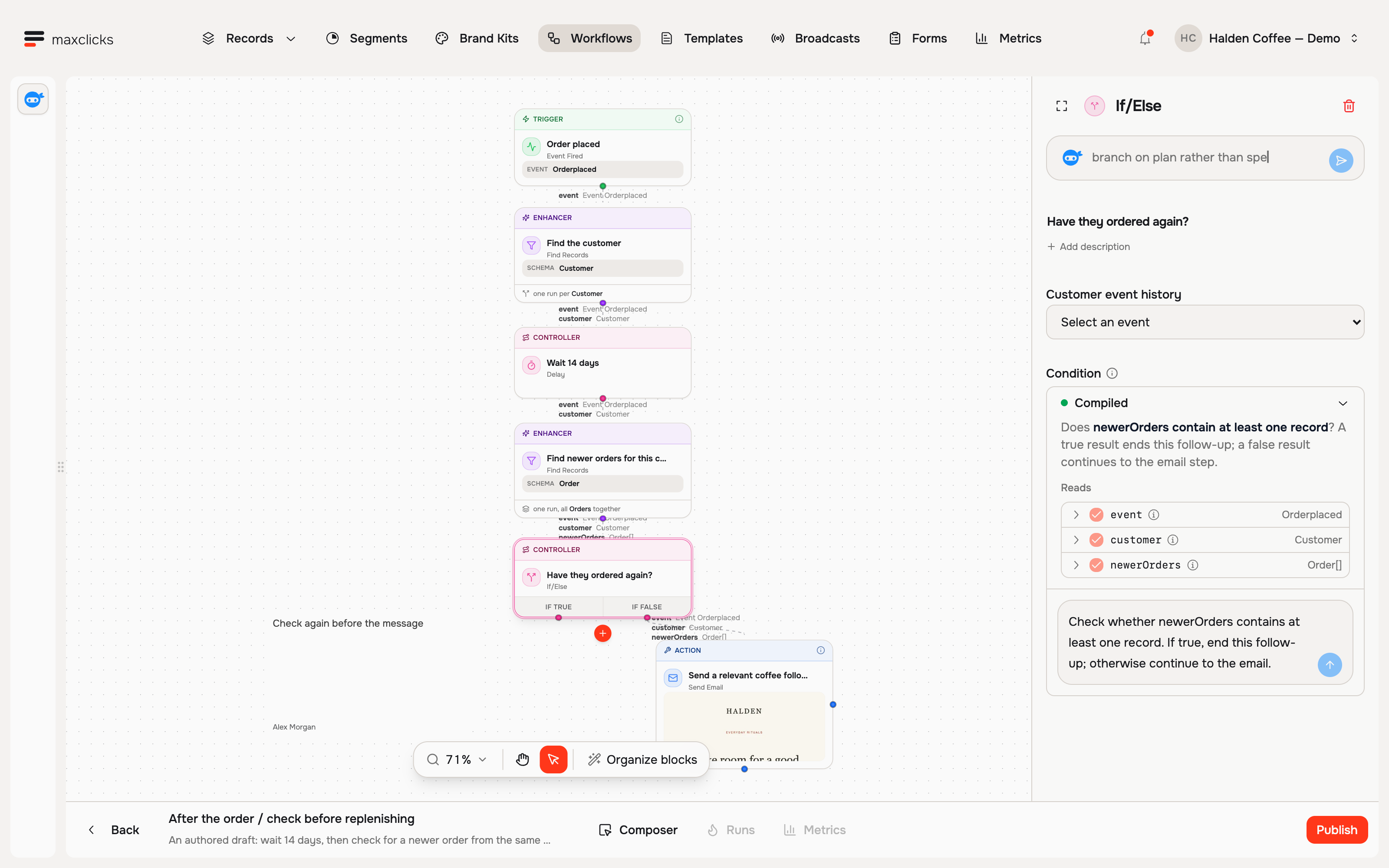
The Runs and Metrics tabs become available after the first publication. Runs shows the path one execution took; Metrics summarizes a selected version.
Start with a trigger
Every workflow needs at least one trigger and can have several. Triggers have no incoming links.
| Trigger | Use it for |
|---|---|
| Scheduled Timestamp | One dated execution, or execution on publication when its time is blank. It has no recurrence. |
| Record Created or Updated | A new record or a record entering your saved condition or segment. Without a filter, every create and update qualifies. |
| Record Deleted | Responding to deletion of a matching contact or object. |
| Event Fired | A business event or selected collected-event definition, such as an order or signup. |
| Email Event | Selected activity on workspace emails. Use a Send Email event branch to respond only to that step’s mail. |
| Evaluated attribute threshold | A published Scheduled value crossing a boundary, such as purchase total entering a band. |
| Incoming Webhook | An outside system posting authenticated JSON that matches the expected payload. |
Record updates with a condition use entering-criteria behavior: a record that already matches does not start another run merely because it is saved again. A segment is a filter on that record trigger; it is not a promise that every time-driven membership change starts a run.
Evaluated attribute threshold publication establishes a baseline; existing matches do not all enter immediately. Choose an enabled Scheduled evaluated attribute with an available Event source, then set Comparison, Threshold value and Crossing direction. On demand attributes are not eligible. For At least 2 with Enter the condition, 1 → 2 qualifies while 2 → 3 does not.
The fixed threshold output retains the identified subject, attribute generation, previous/current values, direction and time. Load that subject's contact separately when the email needs an address. Reading today's attribute value does not replace the evidence that caused enrollment.
A collected-event trigger pins the selected definition at publication. Review its source and identity mapping. The block library explains each trigger's inputs and output.
Add steps
Use a step's + connection control, choose its type and fill in its sidebar. An empty placeholder can remain while building but blocks publication.
- Enhancers: Find Records, Set Value, Query, AI and For Each supply or reshape run data. AI can also use tools you explicitly grant.
- Controllers: If/Else and Switch select paths; Delay waits.
- Actions: Create or Update Records, Delete Records, Fire Event, HTTP Request and Send Email act on workspace data or another system.
- Decorators: Note explains the canvas and does not execute.
For logic, describe the customer decision and send it to maxinja. Review Compiled, Depends on and Reads. A measurable rule should compile. An uncompiled If/Else, Switch or Delay can call a model on every run and requires its own Model and Thinking settings.
Connect steps with links
A step's slots are its output points. Each slot can connect to at most one next step. If/Else has If true and If false; leaving a branch unconnected ends the run on that path. Switch needs an explicit case for every permitted answer, including a catch-all when needed.
Every non-trigger step except Note needs an incoming link. Cycles are not supported. When multiple paths join, a later step can rely only on data available from all those paths.
How data flows through a run
The trigger supplies the initial context. Later steps add named results, such as newerOrders, which a branch can inspect. A step cannot read a result that has not been produced yet.
Ordinary records are read as needed. A Query result describes its lookup at that point: put a new Query after a wait when you need to check what changed. Evaluated attributes run saved lookup logic on demand; Scheduled evaluated attributes use published generations pinned for the root run and its children. Recorded decisions and loop inputs can remain fixed during recovery. See data expansion.
Process each record separately makes Find Records, Create or Update Records and Delete Records continue with one child run per result. An empty result ends that fan-out. Unchecked, the run continues with a list, even when empty. For Each always creates one child per item. Find Records lists and For Each inputs are limited to 1,000; use Find Records with separate processing for larger record selections.
Let maxinja build it for you
Use the chat to create or refine the journey, with the workflow attached. State the trigger, who it belongs to, timing, decision and desired saved state. A follow-up such as “Keep the 14-day wait; only count completed orders; keep it unpublished” gives a precise correction.
maxinja saves changes as it works and can publish when asked. Stopping the chat keeps completed changes. A saved draft and an assistant completion message do not establish that the workflow has run.
Verify a first result
Use a test copy restricted to contacts you control. Remove customer-facing email and other external actions while checking the decision, shorten the copy's delay, publish it and create fresh qualifying events. This is real execution and uses credits. In Runs, compare the contact, Query result and branch for a customer with a newer order and one without. Pause the copy after checking.
Publication freezes the steps, links and step-owned emails as a version. Later draft edits apply to future triggers only after another publication. Existing runs keep their original version. Publishing also resumes a paused workflow, so inspect old waiting execution before releasing a correction.
Use Stop new runs when enrollment should stop while existing customers finish. Use Pause to park further execution across the workflow. Use Terminate run in Runs to end one run, its children and pending continuations. Accepted emails, external requests and incurred charges remain.
If Needs attention appears, read the run's recovery reason and inspect accepted effects. That run does not continue automatically. A preview, a top-up or a new publication does not establish that repeating the held action is safe.
The controlled-run walkthrough demonstrates this with an onboarding journey. Test the final email separately, restore the production timing, then follow publish, pause, and version a workflow.
Frequently asked questions
Does an email preview test the earlier workflow steps?
No. It renders the email with sample data. Use a controlled execution to inspect the customer lookup, Query result and branch in Runs.
Why did one event create several journeys?
Check Find Records and Process each record separately. A broad match can create one child per customer. For Each also creates a child per item; use the parent relationship in Runs to trace the split.
Does the workflow start customers who qualified before publication?
Publication is not a general historical backfill. Threshold publication establishes a baseline, and collected-event triggers establish their source frontier. Review an initial audience separately when needed.
Do I need AI for the newer-order check?
Use Query and a compiled condition for a measurable check. An AI step interprets supplied context, and Adaptyle generates instructed email passages. Those model operations add their own usage.
Did this article answer your question?