Loading the guide…
How unsubscribes and preferences work
Learn how one-click unsubscribe, topic and channel opt-out, the public preferences page, and resubscribing keep your contacts in control of what they receive.
On this page
Every marketing email you send gives the recipient a way to opt out. maxclicks handles the unsubscribe and preferences flow for you, injecting the link and the headers, honoring the choices, and recording each change for compliance. This article explains what happens when a contact clicks unsubscribe, the difference between leaving a topic and leaving the channel, how the public preferences page works, and how someone can come back.
Two ways to opt out
Marketing email gives the recipient two routes out, and they behave differently. Both are added automatically at send time, so you never place them yourself.
- The footer carries a single Unsubscribe link. It opens the hosted preferences page, where the contact turns their email subscription off or leaves a topic and saves the change.
- maxclicks also adds the RFC 8058
List-Unsubscribeheaders to every marketing message. Those headers power the unsubscribe button the mailbox itself shows, which opts the recipient out immediately, with no page to visit and nothing to confirm.
Transactional email gets neither: no footer unsubscribe link and no one-click headers, because there is nothing marketing to leave. If you are unsure which type your content is, read understand transactional vs marketing email.
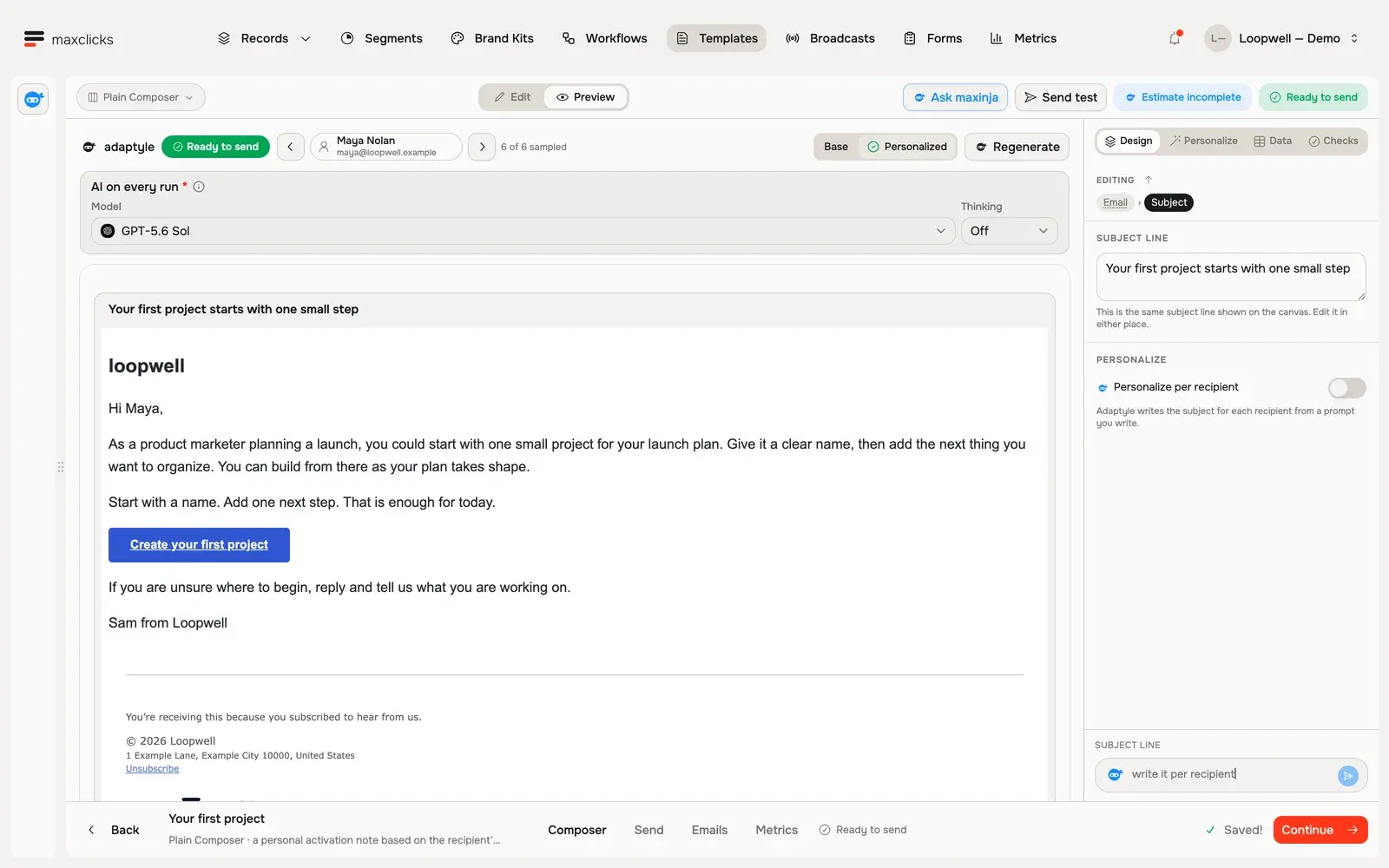
Walkthrough steps
With Maya selected, request a real personalized preview and wait for it to finish. Read the generated next-step advice using her product marketing role and launch use case. The template retains its button, sign-off and footer. No email is sent; separate generations can vary.
Topic-level versus channel-level unsubscribe
What an unsubscribe actually does depends on whether the email was bound to a communication topic. This is the single most important distinction to understand.
A communication topic is a named category of marketing mail, such as Marketing, Product updates, or Weekly digest, that contacts can subscribe to independently. When you build content, you can bind it to one topic.
Unsubscribing from a topic-bound email
If the email was sent under a topic, the unsubscribe removes the contact from that topic only. They stop receiving mail on that topic but keep receiving your other topics and general marketing. No suppression is created, so the contact stays fully reachable elsewhere.
Both routes honor this. The mailbox button drops the topic outright, and the footer link opens the preferences page with that topic already unticked, ready for the contact to save.
This is the gentler outcome, and it is why topics are worth using. A reader who is tired of your weekly digest can drop just the digest instead of leaving your list entirely.
Unsubscribing from an email with no topic
If the email was not bound to any topic, the unsubscribe is broader. It opts the contact out of all marketing email and creates an unsubscribed suppression on their address, so no marketing reaches them until they opt back in.
The practical takeaway: bind marketing content to a topic whenever you can. It gives contacts a precise choice and keeps a single opt-out from removing them from everything.
The public preferences page
The footer Unsubscribe link opens a hosted page that belongs to the contact, not to your team. It needs no login. maxclicks authenticates the page with an encrypted token embedded in the email link, so the person who received the email can manage their own settings and no one else can.
On the preferences page a contact can:
- Leave or rejoin any public topic you have defined, then save the change.
- Unsubscribe from all future email in one action, or resubscribe.
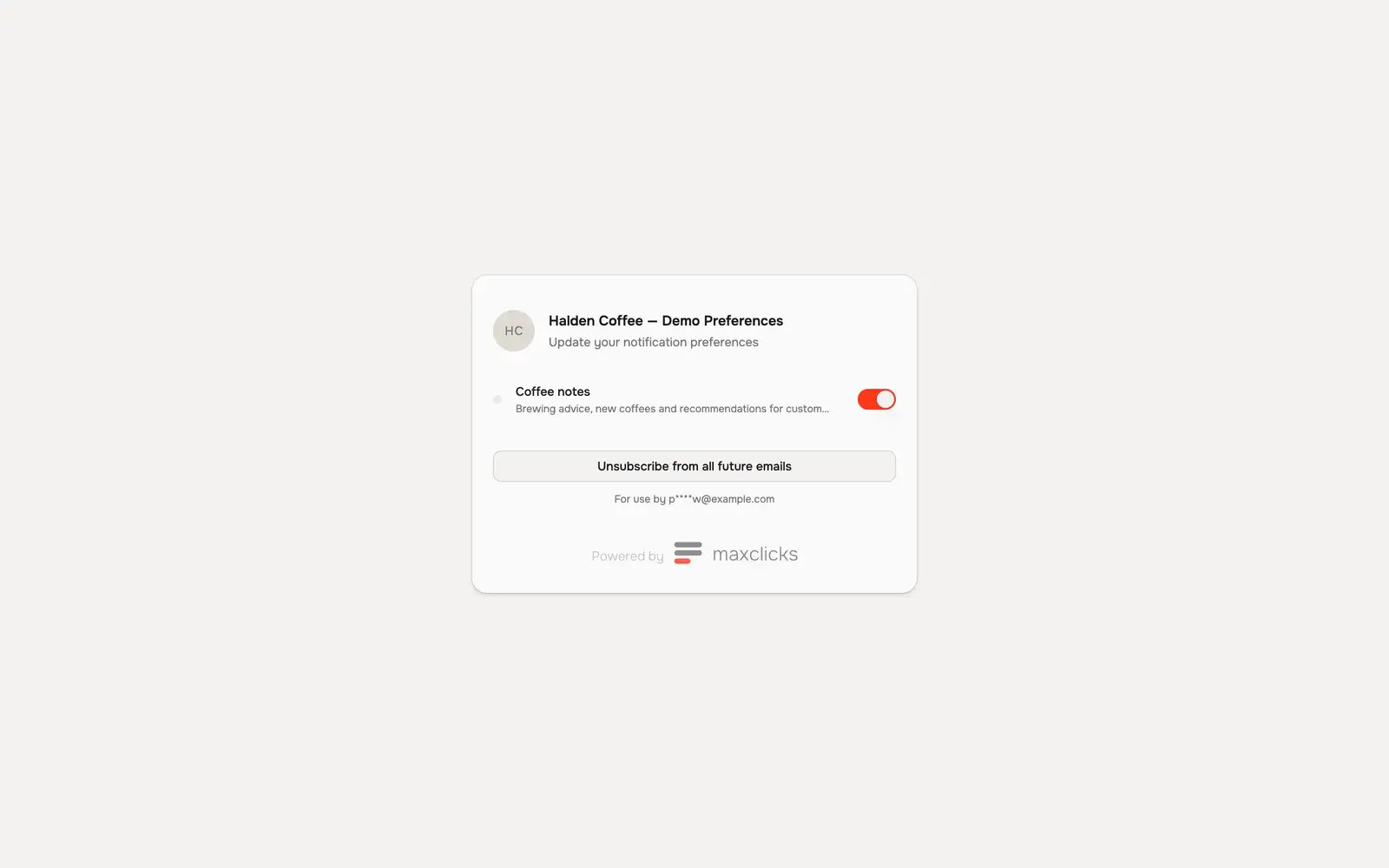
The page always reflects your current topics, so as you add topics they appear for contacts to opt into. It needs no account, which is what deliverability guidance and consent law both ask for: the recipient can change their own mind without going through you.
Private topics
A topic can be marked private. Private topics do not appear on the preferences page unless the contact has been granted access to that topic. Use a private topic for a segment-specific stream, like a VIP program or a beta cohort, that you do not want every contact to see and self-join. Public topics are the ones anyone can find and join from their preferences page.
What gets recorded
Every consent change is written to an audit trail on the contact, whether the contact made it, a teammate made it, or the system made it after a bounce or complaint. Each entry captures what changed, when, and the context, which is exactly what you need to prove compliance if a recipient or a regulator ever asks. You do not manage this log; maxclicks keeps it automatically. The current subscription and topic state is also visible on the contact record itself, described in add and edit contacts.
Where consent begins
An unsubscribe is the end of a consent lifecycle that starts when the contact opts in. How that opt-in is recorded shapes how clean your list stays.
- Forms are the cleanest source, because the contact chooses to submit. A form can imply consent on submission, require an explicit checkbox, or collect no marketing consent at all. Some forms add double opt-in, where the contact must confirm through a link before they are subscribed, so the consent is verified rather than assumed.
- API, import, and workflow contacts default to subscribed. If you cannot prove those people opted in, set their subscriptions to empty when you create them, so you never send marketing without consent. See add and edit contacts for how subscriptions sit on a contact.
Whichever way a contact arrives, the preferences page and the unsubscribe links then hand control back to them. Consent you collect at the start and honor at the end is what keeps a list healthy and your mail in inboxes.
Resubscribing
Opting out is never permanent. A contact can come back, and there are two paths depending on how they left.
- The contact opts back in themselves
The contact reopens their preferences page from any earlier email link and turns their email subscription back on, or rejoins a topic they left. maxclicks clears the unsubscribed suppression for them at the same time. This is the cleanest path, because the contact records their own renewed consent.
- A teammate restores consent on request
If a contact asks your team to resubscribe them, a member with Write permission can clear the unsubscribed suppression and restore the subscription from the contact record. Both actions are needed here. Only do this with a real request from the contact, and note it, because you are recording consent on their behalf.
Because a channel-level opt-out leaves a suppression, flipping the subscription back on from the contact record is not enough on its own: the suppression has to be removed too. The contact's own preferences page does both in one action. Topic-level opt-outs leave no suppression, so rejoining the topic is all it takes. This is one more reason to prefer topic-bound marketing.
Related deliverability topics
Unsubscribes are one input into the wider suppression system that decides who your mail can reach. To see the full picture, including hard bounces and spam complaints, read manage suppressions. To understand why only marketing mail carries these links, read understand transactional vs marketing email.
Frequently asked questions
What is the difference between unsubscribing from a topic and from the channel?
Unsubscribing from a topic-bound email removes the contact from that one topic and leaves everything else intact, with no suppression. Unsubscribing from an email with no topic opts the contact out of all marketing and creates a suppression on their address. Binding content to topics gives contacts the narrower, friendlier choice.
Do contacts need an account to manage preferences?
No. The preferences page is authenticated by an encrypted token in the email link, so a contact can manage their own subscription and public topics with no login. Each link is personal to the recipient who received the email.
Why can't a contact see one of my topics on their preferences page?
That topic is probably private. Private topics only appear for contacts who have been granted access to them. Public topics show for everyone. Mark a topic public if you want any contact to find and join it from their preferences page.
Can I resubscribe a contact who unsubscribed?
Only when they ask. If they opted out of a topic, they rejoin it. If they opted out of the whole channel, the cleanest path is for them to resubscribe from their own preferences page, which clears the suppression at the same time. Doing it for them takes Write permission and two actions: restore the subscription on the contact record, then clear the unsubscribed suppression. Never do this without a genuine request from the contact.
Does a transactional email have an unsubscribe link?
No. Only marketing email carries the footer Unsubscribe link and the one-click headers. Transactional email, such as a receipt or password reset, is a direct response to the recipient's own action and has nothing marketing to leave, so it ships without either.
Did this article answer your question?