Loading the guide…
Read your usage report and invoices
Learn how to read the usage report's category and member breakdowns, manage payment methods and invoices, and understand what cancelling changes.
On this page
Every billable action in maxclicks is recorded and reflected in your reporting. The usage report tells you where your credits went, by category and by member, while the invoices section tracks what your subscription charged. This article explains how to read your usage, manage your payment methods and invoices, and what happens to your space if you cancel.
The usage report
Open Settings, then Billing, then the Usage tab. It renders on any plan.
The tab renders the Usage Explorer: a spend chart over a date range, a Total, Average, and Peak summary, and a set of breakdown tables underneath. It is an analytics view, not a line-by-line ledger. There is no list of individual charges, and no charge is linked back to the specific broadcast, template, or workflow that caused it.
What the explorer does give you is two ways to slice the same spend:
- Per category. Spend is grouped into assistant, template, broadcast, workflow, and miscellaneous, which shows which part of the platform your credits go to.
- Per member. A member breakdown and a leaderboard show how much each member's actions cost, which shows who is driving spend.
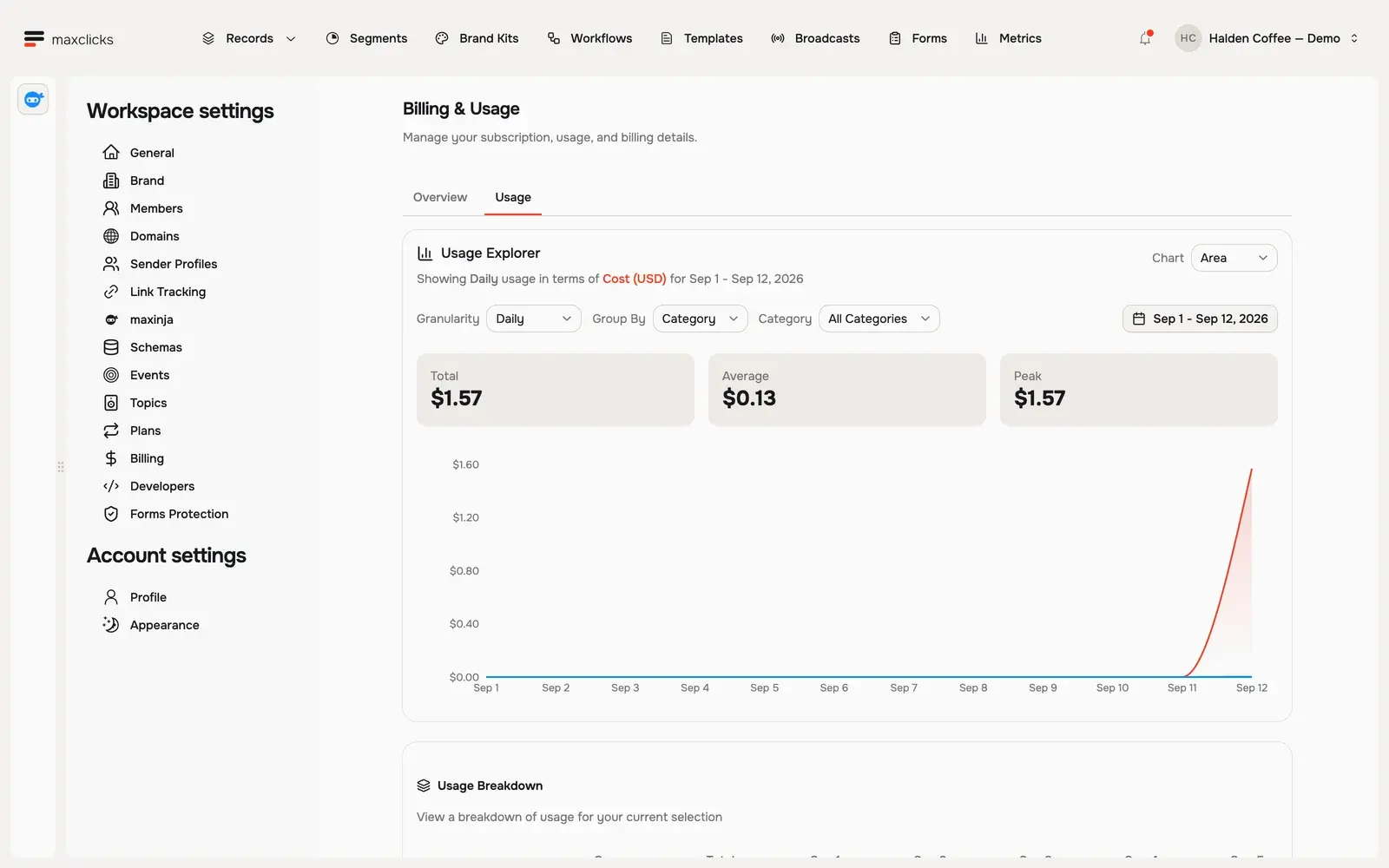
Because a credit equals a dollar, the cost column is also the dollar column. For the mechanics of what draws credits, read understand credits and auto reload.
Reading the explorer
Start with the filters at the top of the card. You choose a date range (a preset such as this month, or a custom range), a granularity of daily, weekly, or monthly, a grouping of none, category, or member, and optionally a single category to filter down to. You can also switch the chart between bar, stacked, line, and area.
Read the chart first for the shape of your spend, then the summary for the totals, then the breakdowns for where it went. A month where the broadcast category dwarfs the workflow category tells you your sending content is doing the spending; a member leaderboard with one name far ahead tells you where to look next. Because the grouping stops at the category level, the explorer answers "broadcasts cost more than workflows this month", not "this particular broadcast cost the most".
The report is still where you separate cheap deterministic work from costly AI work. Two broadcasts to the same list can cost very different amounts depending on whether their content asked the AI to personalize each message, and a jump in the broadcast category is your signal that it did.
Payment methods
Your payment method is the card maxclicks charges for the subscription and for credit top-ups. You add and update it directly in the app; there is no separate external checkout to visit. The Payment methods card sits beside the credits and invoices cards, on any plan.
- Open billing
Open Settings, then Billing. The Payment methods card shows the cards on file and which one is the default.
- Add or update your card
Click Add card and enter the card details. The same card is used for the subscription renewal, manual credit charges, and auto reload.
If a charge needs extra bank verification, such as 3-D Secure, maxclicks prompts you to complete it at the moment of the charge. Keeping a valid card on file is what lets auto reload and renewals run without interruption.
Invoices
Invoices record what maxclicks charged: on Pro the base fee, seats and record packs, and on any plan the credit top-ups you bought. They appear under Billing and stream live, so a new invoice shows up as soon as it is generated rather than after a delay. A space that has never been charged sees an empty card.
Email beyond your included allowance is not an invoice line. Extra sends are charged against your credit balance instead, so they show up in the usage report rather than on an invoice.
Each invoice reflects the automatic quantity counting described in understand plans. On the monthly interval, seat and record-pack quantities move up and down with usage between invoices. On the annual interval, mid-term growth is charged immediately and prorated to the renewal date, so you may see a prorated line for a seat or record pack you added part way through the year. You can open any invoice to see its line items.
The two documents answer different questions, and it helps to keep them straight. The usage report is about credits, the pay-as-you-go AI work and any email overage, grouped by category and by member. Invoices are about the subscription: the base fee, seats, record packs, and any credit top-ups you bought. A spike in your usage report points at a category or a member, while a change on an invoice points at a seat added or a record threshold crossed.
Keep an eye on spend
Invoices stream live, so they double as a monitoring tool. The usage report does not: it is a snapshot of whatever range and filters you last asked for, so revisit it deliberately rather than expecting it to tick over on screen. After a large send, change a filter or reload the Usage tab and confirm the cost matches your expectation.
Scan the report periodically for the category or member driving the most spend, and decide whether a personalized Adaptyle template is earning its per-recipient AI cost or whether a deterministic version would do. On the invoice side, a jump in seats or record packs is your cue that the team or the list grew, exactly the moment to confirm the growth was intended.
Cancelling your subscription
An admin can cancel the Premium subscription from the plan card on Billing. The cancellation is scheduled rather than immediate: the plan stays active until the end of the period you already paid for, and a Resume subscription button appears until then.
In practice, a space that has dropped back to Free behaves like this:
- It is back under the Free plan's hard cap of 100 emails per month, which resets monthly. Once it hits zero, sending is refused until the reset.
- It keeps whatever credit balance it had, carried over from the Premium wallet, and spends it down as normal.
- It keeps the Credits Balance card, and an admin can still top up by manual charge or auto reload.
- Usage analytics and invoices stay where they are.
Once the carried-over credits run out, credit-based actions stop with "Insufficient credits" until an admin tops the wallet up. The one-time 5-credit free grant is not re-issued, since it is given once per space.
Before you cancel, it is worth doing three things. Pause any live workflows that spend credits, so a running automation does not drain the wallet unattended. Note your remaining credit balance, so you know roughly how much AI work you have left. Size your sending against 100 emails a month, because that cap comes back the moment the subscription ends.
Where billing fits together
The usage report, invoices, and cancellation are the reporting and lifecycle side of billing. The plan side, base fee, seats, record packs, and included email, is covered in understand plans. The wallet side, what credits are and how to keep them topped up, is covered in understand credits and auto reload.
Frequently asked questions
Can I see which campaign a charge came from?
Not an individual campaign. Usage is grouped by category (assistant, template, broadcast, workflow, miscellaneous) and by member, which is how you see that broadcasts cost more than workflows this month, or which member drove the spend, but not which specific broadcast or workflow it was.
Where do I update my card?
Under Settings, then Billing, in the Payment methods card. You enter the card directly in the app, with no separate external checkout. The same card covers subscription renewals, manual credit charges, and auto reload.
How current are the usage report and invoices?
Invoices stream live: a new one appears in the list as soon as Stripe generates it. The usage report does not. It is fetched when you open the Usage tab and refetched when you change the date range, granularity, grouping, or category filter, so reload or change a filter to see very recent spend.
What happens to my space if I cancel Premium?
The cancellation is scheduled for the end of the period you paid for, and you can resume before then. Once it takes effect, the space returns to the Free plan: the 100-emails-per-month cap comes back with a fresh monthly reset, and whatever credits you had are carried across, with an admin still able to top the wallet up.
Do I get the Free plan's 100 emails back after cancelling?
Yes. When the subscription ends, the space drops to the Free plan and its 100-emails-per-month allowance is restored, with the monthly reset starting again from that point. Sending is then refused once you hit that cap for the month.
Did this article answer your question?