Loading the guide…
Meet maxinja, your AI assistant
Learn what maxinja can do in your space, how to give it context, and where it works across the app.
On this page
maxinja is the AI assistant built into maxclicks. Give it a task and it can investigate your space's data, create or change broadcasts and emails, build workflows, and take supported scheduling and publishing actions. It works in a pane beside your product, where you can inspect the resulting work and steer it in conversation. This guide covers the actions it can take and the context it needs.
Where maxinja lives
maxinja is a chat assistant that opens in a resizable pane on the left of the app. You can widen it, or let it take over the full view when you want room to work with it. It is per-user: your sessions are your own, and you carry maxinja with you across every page of your space.
Sending maxinja a message needs Write permission, even to ask a question. A Non-paid Admin can open the pane but cannot run an exchange, so ask an admin for the Admin or Member role if you need to use it. Invite your teammates covers the roles.
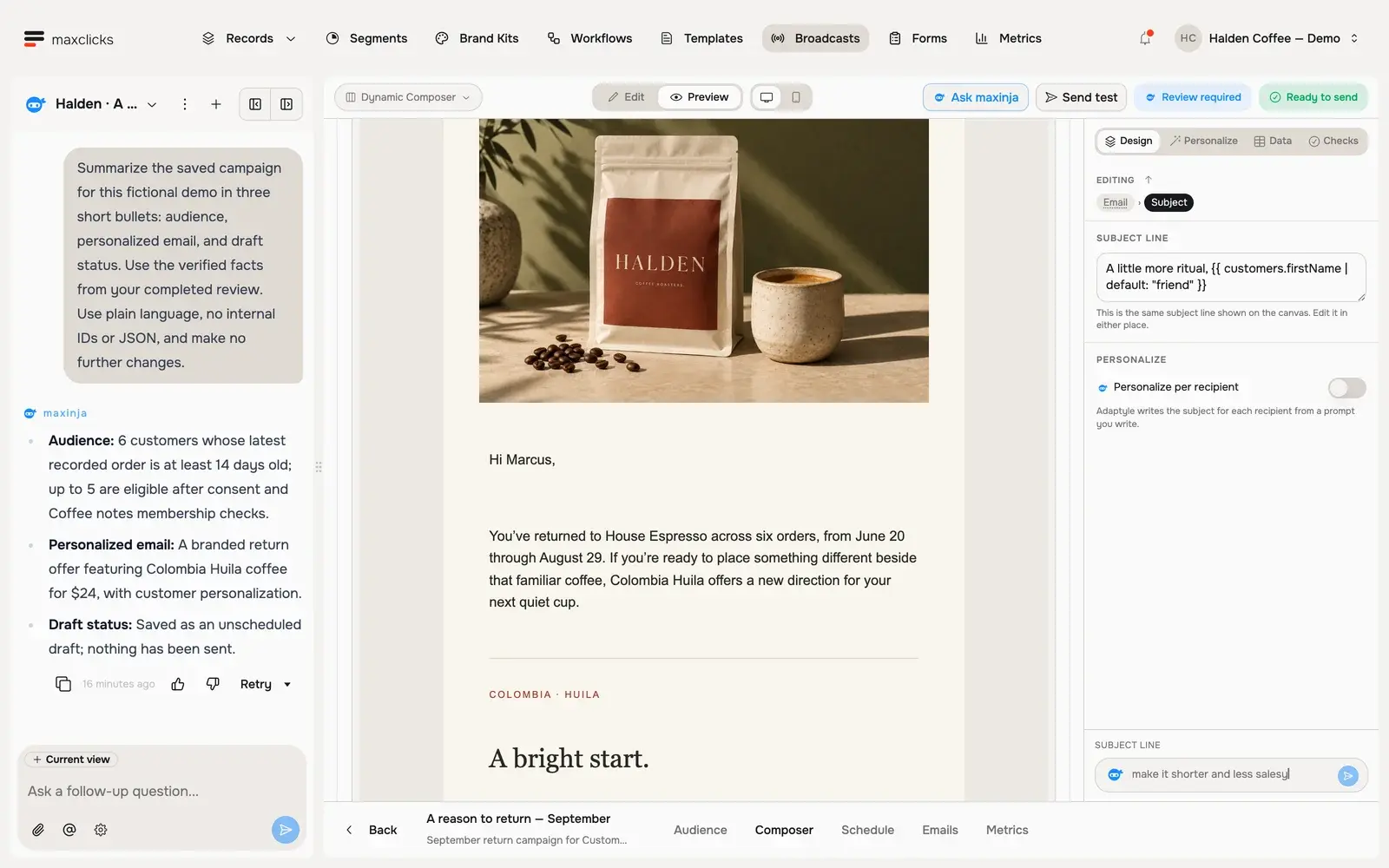
Walkthrough steps
Read maxinja’s completed review of a real Halden campaign draft. Inspect the actual audience count, available draft controls and saved Marcus preview. The agent corrected the audience and sender and left the campaign unscheduled. This is a walkthrough of the completed review, not a recording of live campaign creation; no email is sent.
What maxinja can do
maxinja can combine investigation, creation and changes in one request. Its available actions depend on the part of the product it is working with.
- Answer platform questions. Ask how a feature works, what a term means, or how to accomplish a task, and maxinja answers from its knowledge of the platform.
- Query your real data. maxinja can read your space's actual records, segments, and metrics through safe read-only tools, and answer questions like how many contacts match a description or what a contact's recent activity looks like.
- Build and schedule a broadcast. maxinja can create a broadcast, select an existing segment or generate a custom audience condition, and create its email. When your request calls for sending, it can set the broadcast to send now or at a specified time, subject to the campaign's sending requirements.
- Create and refine email templates. Ask for a stored template or changes to a broadcast's email. maxinja can configure its sender, selected brand kit, customer context and content, then generate sample data and inspect a rendered preview.
- Build and run workflows. maxinja can lay out an entire workflow: the step graph, each step's configuration, the links between steps and the canvas layout. It can also publish changes, pause a published workflow or resume a paused one when you ask.
- Help with initial setup. While your space's setup is incomplete, maxinja can help create initial schemas and stored or evaluated attributes, propose a CSV mapping with sample rows, and extract a brand kit from your website. Website extraction publishes the kit immediately; inspect and refine it before selecting it for a campaign. This onboarding capability is separate from the tools available in general chat after setup.
State the result you want and where maxinja should stop. For example, “Build the campaign and leave it unscheduled for review” requests a checkpoint; “Schedule this broadcast for Friday at 10:00 in my time zone” requests an action. You can include creation and scheduling or publishing in the same brief. The audience, email and workflow remain inspectable in their product pages, and follow-up messages can refine the work.
Scheduling a broadcast can lead to email dispatch; publishing makes a workflow version active. Pausing holds further workflow execution but does not undo completed changes or recall accepted emails. These actions still enforce your permissions and the product's configuration and sending checks.
Give maxinja context
maxinja works best when it knows what you are looking at and which entities you mean.
- Let it read the current view
maxinja automatically detects the page you are on. Open a broadcast and ask it to adjust the subject line, and it knows which broadcast you mean without being told.
- Mention entities with @
Type @ in your message to reference a specific entity by name: a schema, segment, template, broadcast, workflow, webhook, form, or brand kit. This points maxinja at exactly the right thing, for example "compare @Newsletter and @Product update open rates". Individual contacts and objects are not in that list, so to talk about one, open its record page first and let maxinja pick it up from the view.
One exchange runs at a time. If you send another message while maxinja is still working, that message becomes steering input for the exchange in progress rather than a new request, which nudges it as it goes.
Ask maxinja across the app
Beyond the chat pane, maxinja powers the AI generation built into individual pages. These are the Ask maxinja affordances: you describe what you want in your own words, and maxinja generates the underlying logic, which you then review as a plain-language description with a live preview.
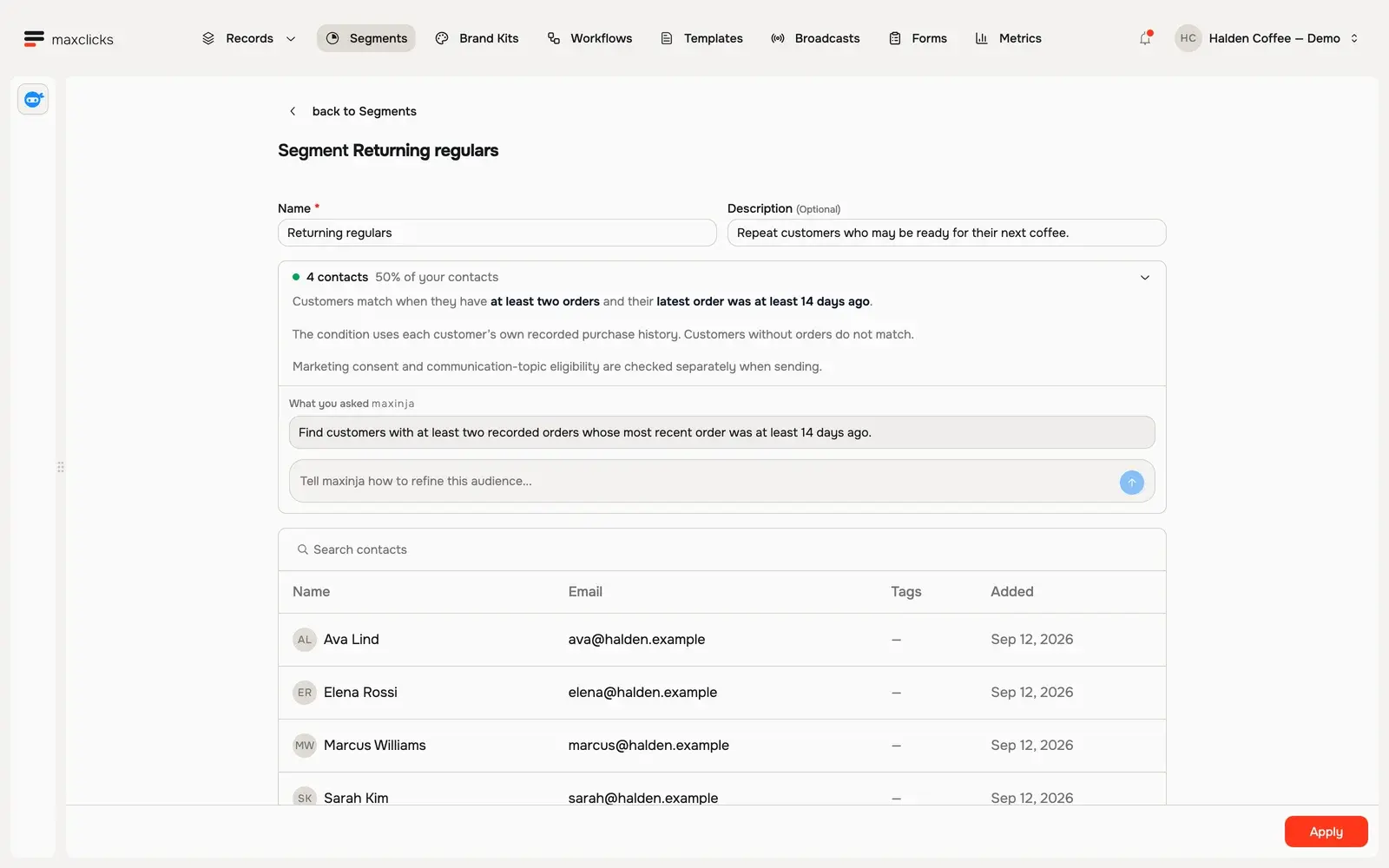
Walkthrough steps
Review Returning regulars: at least two orders and no order in the last 14 days. Inspect the four matching customers, then return to the requirement and refinement box. This walkthrough inspects an existing saved segment.
| Where | What Ask maxinja generates |
|---|---|
| Segments | The condition that defines a saved audience, with a live matching count. |
| Evaluated attributes | The logic for a computed attribute on a schema. |
| Workflow step logic | Branch conditions, delays, and other step expressions. |
| Webhook filters | The condition that decides which changes a webhook sends. |
A broadcast audience is not one of these. You pick it from your segments on the audience page itself. To describe one in your own words instead, ask maxinja in the chat pane and it configures the broadcast for you.
You never see or write the raw logic: maxclicks keeps it behind your requirements and a readable description, so you iterate by refining the prompt. Learn the flow in create a segment, and see where computed values come from in add attributes to a schema.
What maxinja does not do yet
maxinja has clear edges, and knowing where they are saves you a wasted exchange.
- General chat does not create every entity. Use the on-page Ask maxinja affordances for segments and attributes, and manage schemas and webhooks in their own Settings pages. During incomplete initial setup, the onboarding assistant can create your initial schemas and attributes; that does not make unrestricted schema creation available in general chat afterward.
- Actions still need valid configuration. A request to send or publish does not bypass permissions, required data, domain verification or the applicable sending checks. If you want to inspect the work before an action, include that checkpoint in your instructions.
- Follow-ups steer the current exchange. Another message while maxinja is working updates the task in progress rather than starting a separate exchange.
When maxinja cannot do something directly, it can still explain how to do it yourself and point you to the right page.
Manage your sessions
Each conversation is a session. maxinja auto-generates a title from what you discussed, and you can star a session to keep it handy, vote on a response to give feedback, or delete a session you no longer need. Starring is useful for a running thread you return to, such as an ongoing campaign.
Frequently asked questions
Can maxinja create a segment for me in chat?
Not from the chat pane. maxinja builds broadcasts, templates, and workflows end-to-end there. To create a segment, use the Ask maxinja generation on the Segments page, where you describe the audience and maxinja produces the condition.
Can maxinja schedule a broadcast or publish a workflow?
Yes. Your request can ask maxinja to send a broadcast now, schedule it for a specified time, publish a workflow, or pause or resume its published version. It takes those actions through the product's tools, with the same permissions and configuration requirements. If you want a draft first, say to leave the broadcast unscheduled or the workflow unpublished for review. There is no requirement to operate those controls manually yourself.
How do I point maxinja at a specific contact or broadcast?
Type @ in your message and pick the entity by name. Individual contacts and objects are not in that list: to talk about one, open its record page first, and maxinja picks it up from the view you are on.
Why can I open maxinja but not send it anything?
Sending a message needs Write permission. The Non-paid Admin role has administration access but no editing, so it cannot run an exchange. Ask an admin to change your role from Settings, then Members.
Does using maxinja cost credits?
Normally, yes. AI exchanges and on-page generations use workspace credits. Eligible initial onboarding sessions can instead be platform-funded when a Free-plan space has no available credits and has not received its first domain-verification credit gift. That exception does not remove the credit requirement for ordinary editor AI generation or previews, or the verified-domain requirement for sending.
Did this article answer your question?