Loading the guide…
Work with events
Define business events and collected observations, connect their sources, and use recorded activity in workflows and computed attributes.
On this page
An event records a moment: an order was placed, a user signed up, or a project was created. Define the shape of that activity, connect the source that reports it, and decide how it should inform an audience or workflow.
Start in the event library
Open Settings, then Events. The Event library lists your defined business events and collected events with their source and properties. Use Sources to manage the website or server connections that report observations.
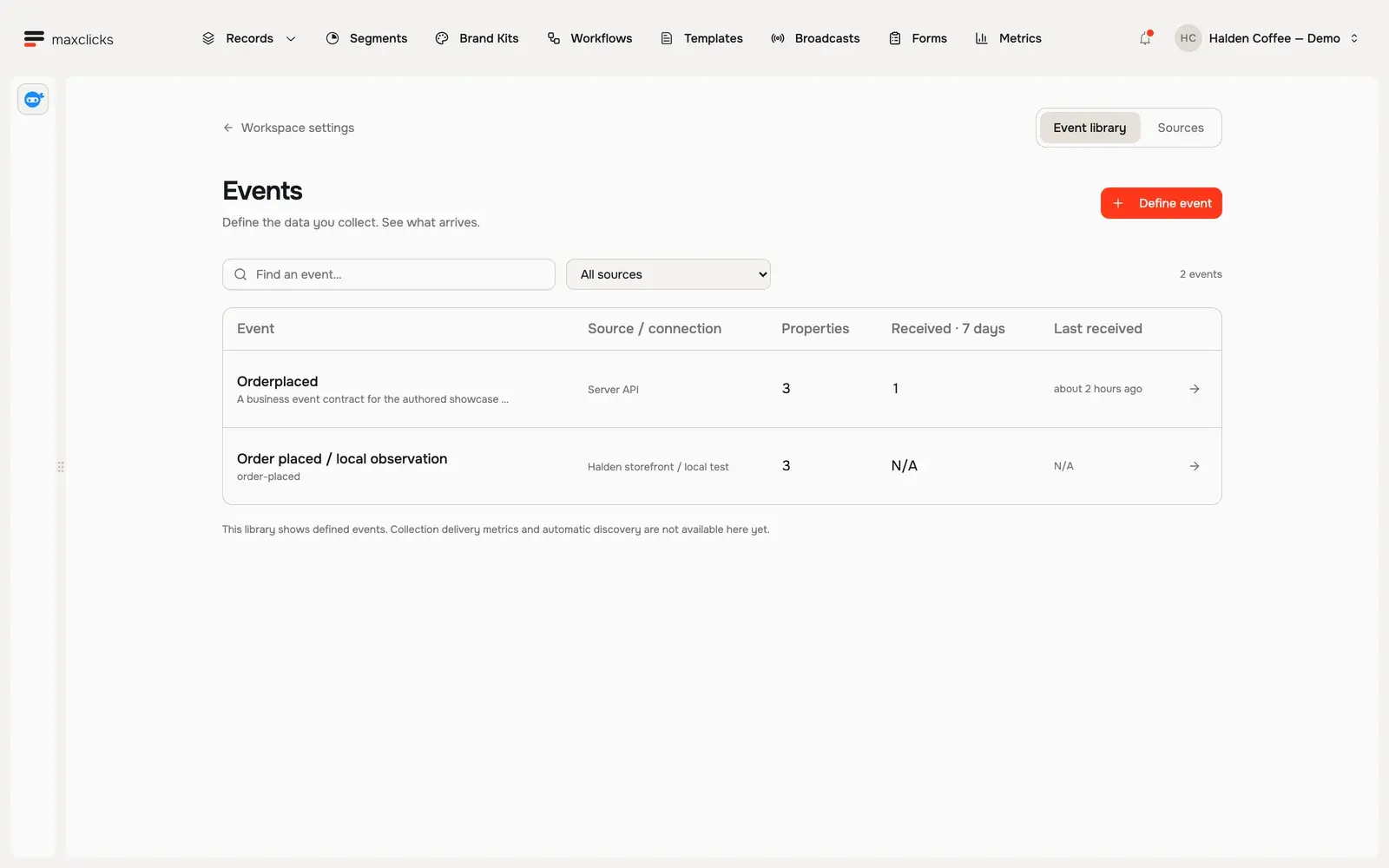
The two kinds of event serve different needs:
| Kind | Use it for |
|---|---|
| Business event | A declared action such as OrderPlaced that can trigger a workflow or be fired by a workflow step. Its payload can provide the keys used to look up the relevant contact or object. |
| Collected event | An observation reported through a configured Browser SDK or Server API source. The definition describes its properties, context and subject. Recorded history can support computed attributes and conditions. |
Connect a collection source
- Open Sources
Choose Sources, then Connect source. Give the source a recognizable name and choose its environment and authority: Browser SDK or Server API.
- Keep the authority clear
Browser keys collect anonymous observations. Your authenticated server links a visitor to a customer. Server keys belong on your backend and authorize activity for that source.
- Define the event
Choose Define event and select the source. Set the event key, its subject where applicable, and the properties and context your code will provide. Read the saved definition before wiring up the sender.
One source can report several event types. For example, a product source can report both a signup observation and a first-project observation.
Declare the data you need
Use concrete names and types: an order total is a number, an order number is an identifier, and a project creator key identifies the person who created that project. A description should explain the business meaning, so generated queries have useful context.
Open a definition to inspect its Properties and Context. Business event schemas also expose attributes and their own event history. Do not assume that a field visible in an incoming payload is automatically available to every query; check the event contract and the fields declared for that path.
Connect activity to the right person
A business event workflow often starts by finding a contact from a key in its payload. Match a stable customer or user identifier, not a display name.
Collected observations follow the source's subject and identity contract. A browser observation is not proof of an authenticated customer identity by itself. Link identity through your authenticated server before relying on person-level history.
For a product-activation journey, check projects created by the specific user. A teammate's project is not proof that this person has activated. For a post-purchase journey, look for orders belonging to the same customer and occurring after the triggering order.
Inspect the right evidence
The event library shows defined events. Business events can show recent receipt counts; the collection definition view currently does not show received payloads or collection delivery metrics. N/A in that view is not evidence that your source has received nothing.
Check the response from the API or SDK that submitted the event. For an automation, inspect the workflow's actual run history and the step inputs and outputs. Confirm the workflow is published, its trigger matches the intended event, and the contact lookup and condition use the right keys.
Use history without storing a second answer
An evaluated attribute can derive an answer from recorded history when requested, such as the number of a customer's orders. A collected-event aggregate can summarize observations within a defined window. These are different mechanisms: inspect the saved definition, time window and freshness status before using the result.
For a workflow, a query followed by an If Else step can decide whether a later action already happened. A Wait step gives the customer time before that check. Build and review the graph before publishing it.
Frequently asked questions
Can I send events from a website?
Yes. Configure a Browser SDK source and its event definitions. Keep authenticated identity linking on your server, and use the source's supported collection contract.
Does every event automatically send an email?
No. Define and publish the workflow that should act on it. The trigger, lookup, conditions and email configuration determine what happens next.
Why does a collected event show N/A in the library?
Collection delivery metrics and received payload inspection are not available in that view yet. Use the submitting API response and the relevant runtime evidence; do not interpret N/A as a zero count.
How do I avoid confusing teammates' activity?
Match history to the event's intended person using the appropriate identity or record key. For example, compare a project's creator user key with this user's key, rather than counting every project in their account.
Did this article answer your question?